


Alright, real talk, if you've been sitting on the sidelines watching Lightning Network hype but thinking "that sounds complicated as hell," Zeus is about to change your mind.
This isn't your grandpa's Bitcoin wallet. Zeus is the Swiss Army knife of Lightning wallets: it's got an embedded node living right in your phone, self-custodial Lightning addresses (yeah, that's a big deal), and the flexibility to go from complete beginner to advanced Lightning wizard without switching apps.
Founded by Evan Kaloudis, a developer who literally stood up and said "we're not going anywhere" when other wallets were getting pressured by regulators, Zeus embodies that rebellious Bitcoin spirit. But here's the kicker: beneath all that hardcore self-custody philosophy, Zeus is actually becoming user-friendly. We're talking instant payments, one-tap setup, and features that make Lightning feel like magic instead of rocket science.
Ready to dive into the Lightning Network without the headache? Let's break down everything Zeus offers and see if it's the wallet that finally gets you zapping sats like a pro.
What is Zeus Wallet?
Zeus is a mobile Bitcoin and Lightning Network wallet that does something most other wallets don't: it puts a full Lightning node directly on your phone. Yeah, you read that right, a whole Lightning node, running on your smartphone. But don't freak out, because Zeus makes this tech sorcery feel surprisingly simple.
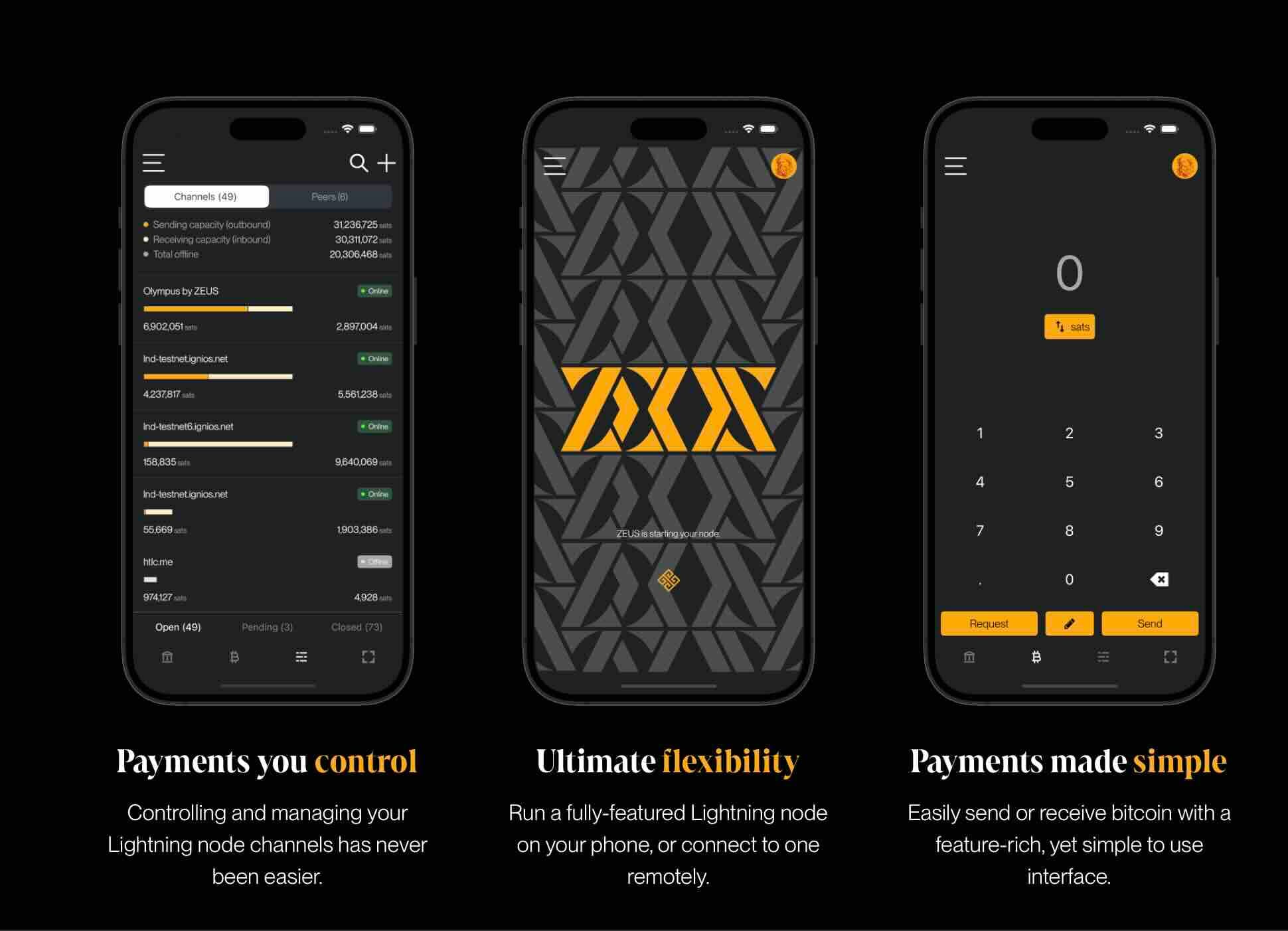
Available on iOS and Android (plus F-Droid for the privacy purists), Zeus gives you complete control over your Bitcoin while leveraging Lightning's superpower: instant, near-zero-fee transactions. Whether you're buying coffee, stacking sats, or managing advanced Lightning channels, Zeus scales with you.
The app comes in two flavors:
- Embedded Node Mode: Hit "Quick Start" and boom—you've got your own Lightning node syncing in minutes. This is the mode most users will love.
- Remote Node Mode: Already running your own Lightning node at home (LND or Core Lightning)? Connect Zeus to it and manage everything from your phone like a boss.
Zeus is completely free, open-source (check out the code on GitHub), and self-custodial. Your keys, your Bitcoin, your node. Period.
The Story Behind Zeus: Built by a Believer
Zeus was created by Evan Kaloudis, a developer who's been grinding in the Bitcoin space since 2017. But Zeus hit its legendary status in April 2024 when Evan tweeted something that made the entire Bitcoin community stand up and cheer: "We're not going anywhere."
This came right after Samourai Wallet developers got arrested and Phoenix Wallet pulled out of the US market. The Bitcoin world was freaked out. Regulatory pressure was mounting. Wallets were retreating. And Evan? He doubled down, publicly committing to keep Zeus alive and fighting for self-custody rights.
That's the energy Zeus brings. This isn't some corporate product designed by committee it's built by someone who genuinely believes in Bitcoin's mission of financial freedom. And that philosophy shows in every feature.
Since its early days as a simple node management app, Zeus has evolved into a full-featured Lightning powerhouse. The v0.8.0 release in December 2023 was massive, introducing the embedded LND node, ZEUS Pay lightning addresses, Simple Taproot Channels, and the Olympus LSP. These weren't just features—they were game-changers that made Lightning accessible to regular people.
Pricing: Absolutely Free (With Some Fees to Know About)
Zeus itself is 100% free. No subscription. No monthly charges. No hidden costs. Download it, use it, that's it.
However, Lightning Network fees exist (tiny ones), and Zeus's Lightning Service Provider (LSP) called Olympus charges for some services. Here's the breakdown:
ZEUS Pay (Lightning Address)
As of December 2024, ZEUS Pay lightning addresses now have ZERO fees for receivers—down from the previous 2.5-10% sliding scale. That's huge. You can receive payments to your custom @zeuspay.com address completely free, as long as you have a zero-fee route from Olympus (which most users automatically have).
The minimum receivable amount also dropped to just 1 satoshi. So yeah, you can receive literally any amount with no fees.
Channel Opening Fees (Olympus LSP)
When you first start using Zeus, you'll need Lightning channels to receive payments. The Olympus LSP can open channels for you automatically:
Just-in-Time Channels (0-conf): These channels open instantly when someone sends you payment. For amounts under 20 sats, there's a 50% fee. For less than 2,500 sats, it's 10%. For amounts over 2,500 sats, there's a flat 250 sat fee.
Purchase Channels in Advance (LSPS1): You can pre-buy channels through Zeus's web portal. Pricing is competitively priced and depends on channel size and current network conditions. Typical setup costs run 6,000-10,000 sats for smaller channels.
Zero-Fee Routing: Here's the cool part—once you have a channel with Olympus, routing payments through Olympus incurs no routing fees on the first hop. You only pay fees for hops beyond Olympus, which are typically negligible.
Bitcoin On-Chain Fees
Normal Bitcoin network fees apply when you send on-chain transactions or open/close channels manually. These are standard mining fees, not Zeus fees.
Bottom line: Zeus is free. Lightning fees are insanely low. The LSP charges modest setup fees (typically $3-10 worth of sats) to get you started, then everything's basically free forever.
Core Features: What Makes Zeus Special
Embedded Lightning Node
This is Zeus's secret weapon. Users no longer have to remotely connect to pre-configured lightning nodes at home or in the cloud—just hit 'Quick Start' and start syncing the blockchain in moments.
Your phone becomes a Lightning node. Sounds crazy, but it works beautifully. The embedded node uses LND (Lightning Network Daemon) v0.18.4-beta and syncs via Neutrino, which uses block filters for privacy—meaning Zeus never sees your on-chain addresses or balances.
Setup takes 5-10 minutes for initial sync, then you're running. Send payments, receive payments, manage channels, all from your pocket.
ZEUS Pay: Self-Custodial Lightning Addresses
ZEUS Pay is the first-ever self-custodial lightning address in a mobile app. Let that sink in.
Lightning addresses are like email addresses for Bitcoin—someone can pay you by sending to yourname@zeuspay.cominstead of dealing with invoices. But most lightning addresses are custodial (someone else holds your keys). Zeus flipped the script.
You get your own custom @zeuspay.com address (like satoshifan@zeuspay.com), but YOU control the funds. The magic happens through wrapped invoices and hodl invoices. You just need to open your Zeus app within 24 hours to claim payments. If you don't, they get returned to the sender.
This is perfect for:
- Receiving zaps on Nostr
- Accepting tips as a creator
- Getting paid by friends without invoice hassles
- Running a small business
And remember—it's now ZERO fees for receivers. Absolutely massive.
Olympus LSP: Instant Onboarding
Olympus by ZEUS is a Lightning Service Provider (LSP) that enables 0-conf channel service—users can generate invoices without having previously set up payment channels and have them paid and settled nearly instantly.
This solves Lightning's biggest UX problem: channel liquidity. New users don't understand inbound/outbound capacity. They don't want to. Olympus handles it automatically.
Generate an invoice. Someone pays it. Olympus opens a channel in the background. Done. You're live on Lightning.
The LSP also provides privacy through wrapped invoices that conceal your node's public key from payers. Nice touch.
Simple Taproot Channels
ZEUS is the first mobile wallet to support Simple Taproot Channels. When you close these channels, you pay lower fees and get more privacy—the channel closing looks identical to any other Taproot transaction on the blockchain.
This matters for privacy advocates and anyone wanting to reduce their on-chain footprint.
Dual Wallet System: On-Chain + Lightning
Zeus separates your Bitcoin into two wallets within the app:
On-Chain Wallet: Regular Bitcoin address for sending/receiving standard Bitcoin transactions. Use this for larger amounts, long-term storage, or opening channels.
Lightning Wallet: Your Lightning channels for instant micropayments. Use this for everything else—buying stuff, zapping people, quick transfers.
You can easily move funds between them via submarine swaps (more on that later).
Contact Book & LNURL Support
Save your frequently-paid contacts and send payments in one tap. You can manually add contacts or import from Nostr (yeah, Zeus integrates with Nostr).
Full LNURL support means you can:
- Scan LNURL QR codes
- Pay to lightning addresses
- Withdraw from LNURL-w services
- Handle all modern Lightning payment standards
Point of Sale (PoS) Mode
Merchants, listen up. Zeus includes a built-in PoS system where you can:
- Set up product items with prices
- Generate payment requests instantly
- Track sales
- Print receipts
- Accept Lightning payments from customers
This turns any smartphone into a Lightning payment terminal. Small businesses can start accepting Bitcoin without expensive hardware.
 Nakamoto Builder
Hardware Wallet Support
Zeus supports connecting to hardware wallets like Coldcard, Ledger, and Trezor for on-chain transactions. This means you can use Zeus as your interface while keeping keys secure on hardware.
You can:
- Craft on-chain transactions
- Open and close channels to/from hardware wallets
- Maintain cold storage while managing hot Lightning channels
Advanced Features for Power Users
- Channel Management: Full control over opening, closing, and managing Lightning channels
- Batch Operations: Open multiple channels or send multiple transactions at once
- Watch-Only Mode: Import xpub addresses to monitor wallets without private keys
- Submarine Swaps: Convert Lightning sats to on-chain Bitcoin and vice versa
- Cashu Ecash Integration: Experimental support for Cashu ecash tokens
- Nostr Wallet Connect (NWC): Connect your Zeus wallet to Nostr apps for seamless zaps
- Multi-Account Support: Run multiple embedded wallets on one device
Privacy Features
Zeus takes privacy seriously:
✅ Neutrino Block Filters: Block sync uses block filters and the Neutrino protocol so Zeus receives no information about users' on-chain funds.
✅ Client-Side Path Finding: ZEUS constructs users' lightning payment paths on their devices, so Zeus doesn't know the final destinations of payments, even when forwarded through their channels.
✅ Wrapped Invoices: When using Olympus LSP, your invoices are wrapped to hide your node's public key.
✅ Tor Support: Zeus can connect through Tor for maximum anonymity.
Using Zeus: Step-by-Step Setup
Let's get you started with Zeus the easy way—using the embedded node.
Download & Install
- Get the app: Download from iOS App Store, Google Play Store, or F-Droid
- Open Zeus: You'll see two options—"Quick Start" or "Connect a Node"
- Hit "Quick Start": This creates your embedded node
Initial Sync
Zeus will start syncing with the Bitcoin blockchain using Neutrino. This takes 5-10 minutes depending on your connection. Grab some coffee. Don't close the app—let it sync in the foreground.
You'll see a progress bar showing block sync. Once it hits 100%, you're golden.
Backup Your Seed
THIS IS CRITICAL. Zeus will show you a 24-word seed phrase. Write it down. Store it somewhere safe. This phrase is your backup—if you lose your phone, you can recover your Bitcoin with these words.
Zeus will test you to make sure you wrote it down correctly. No shortcuts here.
Getting Your First Channel
Now you need Lightning channels to receive payments. Two options:
Option 1: Receive a Payment (Easiest)
- Tap "Receive" at the bottom
- Select "Lightning"
- Enter an amount (or leave blank for any amount)
- Share the invoice/QR code with someone
- When they pay you, Olympus automatically opens a channel
- Done! You're live on Lightning
The channel opens via Zeus's 0-conf protocol—you can receive instantly without waiting for blockchain confirmations.
Option 2: Purchase a Channel in Advance
- Go to Channels (second icon from right at bottom)
- Tap the "+" button
- Select "Purchase inbound channel"
- Choose your channel size
- Pay the invoice (with on-chain BTC or another Lightning wallet)
- Olympus opens your channel
Purchasing channels in advance gives you receiving capacity immediately, without needing someone to pay you first.
Setting Up ZEUS Pay (Your Lightning Address)
Want your own Lightning address? Here's how:
- Go to Settings → ZEUS Pay
- Choose your username (yourname@zeuspay.com)
- Optional: Link your Nostr account for verification
- Done! Start receiving payments to your address
Now anyone can pay you by simply sending to your address—no invoices needed.
Sending Your First Payment
- Tap "Send" at the bottom
- Either:
- Scan a QR code (invoice, address, or LNURL)
- Paste a Lightning invoice
- Paste a Lightning address
- Select a contact
- Confirm the amount
- Slide to send
Payments complete in under a second. Seriously. Instant confirmation. Welcome to Lightning.
Performance: Fast, Reliable, Sometimes Quirky
Speed
Lightning payments through Zeus are instant. Like, blink-and-it's-done instant. On-chain payments take normal Bitcoin confirmation times (10-60 minutes typically).
Initial sync takes 5-10 minutes. Subsequent app opens sync in 30 seconds to 2 minutes depending on how long you've been offline.
Reliability
Zeus is solid but has some quirks:
The Good:
- Payments generally work flawlessly
- Channel management is robust
- Sync issues are rare after initial setup
- The embedded node is surprisingly stable for mobile
The Quirks:
- Initial sync MUST happen in the foreground—don't switch apps or lock your screen
- Sometimes sync gets stuck—going to Menu → Embedded Node → Rescan Wallet usually fixes it
- Neutrino peers can occasionally be slow—you might need to manually add faster peers
- Battery drain can be noticeable during heavy use
Most issues are fixable through the troubleshooting menu or by checking Neutrino peers. The Zeus community on Telegram is super helpful if you hit snags.
Compatibility
Zeus works with:
- iOS: iPhone and iPad (requires iOS 13.0+)
- Android: Any modern Android device (Android 6.0+)
- Remote Nodes: LND and Core Lightning nodes
- Hardware Wallets: Coldcard, Ledger, Trezor, and others
- Third-Party Wallets: Can connect to LNDHub accounts (Alby, LNbits, BTCPay Server)
Advantages: Why Zeus Rocks
True Self-Custody with Real Convenience
Zeus pulls off something most wallets fail at: combining complete self-custody with genuine user-friendliness. You own your keys, you run your node, but you're not drowning in technical complexity. The "Quick Start" flow is legitimately simple.
First Self-Custodial Lightning Address
ZEUS Pay is the first-ever self-custodial lightning address in a mobile app. This alone makes Zeus historically significant. Other addresses are custodial (someone holds your keys) or require running infrastructure (technical). Zeus made it easy.
Open Source & Community-Driven
All code is public on GitHub. No secrets, no backdoors, no corporate BS. The community contributes features, reports bugs, and keeps Zeus honest. This transparency builds trust.
Scales from Beginner to Advanced
Start with simple payments. Gradually learn about channels. Eventually manage advanced multi-sig setups, submarine swaps, and custom channel configurations. Zeus grows with you without forcing complexity upfront.
Committed to Freedom
Remember Evan's "we're not going anywhere" moment? That's not marketing—that's Zeus's DNA. When other wallets fold under pressure, Zeus stands firm. That matters if you care about Bitcoin's mission.
Feature-Rich Without Feeling Bloated
PoS mode, hardware wallet support, Cashu integration, Nostr connectivity, batch operations—Zeus packs tons of features but keeps the UI clean. Advanced stuff is tucked away until you need it.
Olympus LSP Makes Onboarding Painless
The 0-conf channel service from Olympus lowers the barrier to entry dramatically. New users don't need to understand channels—they just work.
Active Development
Zeus ships regular updates with real improvements. Recent releases added Cashu support, swaps, BOLT 12 offers, improved BIP-353 support, and hardware wallet enhancements. The team is constantly pushing forward.
Disadvantages: The Real Talk
Initial Setup Can Be Confusing
Despite improvements, the first-time setup still intimidates newcomers. Syncing takes time, and if you don't understand what's happening, you might think it's broken. More hand-holding in the onboarding flow would help.
Channel Management Requires Learning
Even with Olympus automating stuff, eventually you need to understand channel liquidity, inbound capacity, and routing. Zeus tries to abstract this, but there's only so much you can hide. Lightning has inherent complexity.
Mobile Node Limitations
Running a Lightning node on mobile has trade-offs:
- Your node is only online when the app is open
- Battery drain during heavy use
- Not ideal for routing payments (mobile nodes shouldn't route)
- Performance varies across devices
For receiving and sending payments, it's fine. For advanced node operations, run a dedicated node at home.
Channel Opening Costs
While the fees are reasonable, opening channels costs money (6,000-10,000 sats typically). Complete beginners might be surprised by this "setup cost" when other wallets (custodial ones) seem "free."
Reality: self-custody has costs. But Zeus could communicate this more clearly upfront.
Sync Issues Can Frustrate
When Neutrino peers are slow or your sync gets stuck, troubleshooting requires some technical knowledge. The docs help, but not everyone wants to manually check peer ping times.
iOS App Store Uncertainty
Apple has a history of randomly removing Bitcoin apps. While Zeus is currently available, there's always risk of sudden removal. Android users can sideload via F-Droid; iOS users would be screwed.
Not Ideal for Large Amounts
Lightning is for spending, not storage. Zeus is perfect for daily transactions but shouldn't hold your life savings. Use hardware wallets for serious hodling.
Zeus vs. The Competition
Zeus vs. Phoenix Wallet
Phoenix: More beginner-friendly, automatic channel management, works out of the box. BUT it's custodial—Phoenix holds your keys. Also pulled out of US markets.
Zeus: Self-custodial, you run the node, more control over channels. Steeper learning curve but true sovereignty.
Verdict: Phoenix for absolute beginners who trust the company. Zeus for anyone who wants real self-custody.
Zeus vs. Breez Wallet
Breez: Similar embedded node approach, great UX, built-in podcasting features. Breez also uses an LSP for liquidity.
Zeus: More feature-rich (hardware wallet support, PoS, swaps, Cashu). Better for power users. ZEUS Pay is superior to Breez's lightning address implementation.
Verdict: Breez is slightly friendlier for podcasters. Zeus is more versatile overall.
Zeus vs. Wallet of Satoshi
Wallet of Satoshi: Dead simple, works instantly, no setup. But completely custodial—they hold your keys, know your balances, can freeze your account.
 Nakamoto Builder
Zeus: Self-custodial, private, you own everything. Requires more setup.
Verdict: WoS for tiny amounts and testing Lightning. Zeus for any serious usage where you value freedom.
Zeus vs. BlueWallet
BlueWallet: User-friendly, multi-coin support, nice interface. Lightning functionality is powered by LNDHub (custodial).
Zeus: Self-custodial Lightning with embedded node. Bitcoin-only focus. More security-conscious.
Verdict: BlueWallet for beginners who hold multiple coins. Zeus for Bitcoin-focused self-custody.
Who Should Use Zeus?
✅ Perfect for:
- Bitcoiners who want Lightning without running dedicated hardware
- Anyone wanting self-custodial Lightning addresses for Nostr zaps or tips
- Merchants needing simple Lightning payment acceptance (PoS mode)
- Users graduating from custodial wallets to self-custody
- Node operators who want mobile access to their home node
- Privacy-conscious individuals wanting non-custodial solutions
- Creators accepting Bitcoin tips and donations
❌ Not ideal for:
- Complete crypto newbies with zero Bitcoin knowledge
- People wanting to hold multiple cryptocurrencies
- Anyone needing to store large amounts (use hardware wallets instead)
- Users who refuse to spend 10 minutes learning basics
- People with very old/slow smartphones
- Anyone unwilling to backup seed phrases properly
Tips & Best Practices
Keep ZEUS Online Regularly
Since you're running a node, you should open Zeus regularly and perform the sync process in the foreground—don't push Zeus into the background by using another app. Aim for at least once every day or two.
Use Persistent Mode for Important Operations
Go to Settings → Embedded Node → Advanced and enable "Persistent LND mode" when purchasing channels or expecting important payments. This keeps your node running longer.
Balance Your Channels
If a channel fills up on one side, you lose ability to send (if it's all inbound) or receive (if it's all outbound). Use submarine swaps to rebalance—swap Lightning sats to on-chain when channels are too full, then open new channels.
Check Your Neutrino Peers
If sync is slow, go to Menu → Embedded Node → Peers → Neutrino Peers. Check ping times (under 200ms is ideal). Add your own Bitcoin node as a peer if you have one.
Start Small
Don't load Zeus with thousands of dollars immediately. Start with small amounts, learn how channels work, practice sending/receiving. Graduate to larger amounts once you're comfortable.
Backup Your Seed in Multiple Places
Write your 24-word seed on paper, store it in a fireproof safe or safety deposit box. Consider metal backups for serious amounts. Never store seeds digitally.
Use Hardware Wallets for Large Holdings
Keep large Bitcoin amounts on Coldcard, Ledger, or similar hardware wallets. Use Zeus for spending money—think of it like your regular wallet, not your bank vault.
Final Verdict: Lightning for Real People ⚡
Zeus is what the Lightning Network needs right now: a wallet that takes Bitcoin's most powerful scaling technology and makes it accessible to actual humans. It doesn't dumb things down to the point of removing control (looking at you, custodial wallets), and it doesn't bury you in technical jargon either.
Is Zeus perfect? Nah. Initial setup could be smoother. Channel management still requires some learning. Sync issues can be annoying. Mobile nodes have inherent limitations.
And then there's the philosophy. When wallets were shutting down under regulatory pressure, Evan Kaloudis declared he was going to fight like hell for self-custody Bitcoin and Lightning wallets to continue existing. That's not just talk—it's baked into Zeus's design decisions. Privacy through Neutrino. Open-source code. No KYC. No accounts. Just pure, permissionless Bitcoin.
For anyone serious about using Lightning—whether you're accepting zaps on Nostr, running a small business, or just want to zap sats to friends instantly—Zeus is probably your best bet. It's free, it's powerful, it's getting better with every release, and it's run by people who actually give a damn about Bitcoin's core values.
The Lightning Network is Bitcoin's future for everyday payments. Zeus is how that future becomes accessible today. Yeah, you'll need to put in some effort to learn the basics. But once you do, you'll wonder how you ever lived without instant, free Bitcoin payments at your fingertips.
Lightning made easy? Zeus delivers. Your move.
Frequently Asked Questions
Q: Is Zeus Wallet free?
Yes, Zeus is completely free to download and use. There are no subscription fees. However, you'll encounter small Lightning Network fees when opening channels (typically 6,000-10,000 sats for initial setup via the Olympus LSP) and standard Bitcoin network fees for on-chain transactions.
Q: Is Zeus safe and secure?
Yes. Zeus is self-custodial (you control your private keys), open-source (anyone can audit the code), and uses industry-standard security. However, mobile wallets are inherently less secure than hardware wallets, so don't store large amounts. Zeus is perfect for spending money, not long-term storage.
Q: What's the difference between Zeus and other Lightning wallets?
Zeus runs an actual Lightning node on your phone (most wallets don't). It offers the first self-custodial Lightning address (ZEUS Pay). It's completely open-source and privacy-focused. Most other Lightning wallets are either custodial (they hold your keys) or require connecting to external nodes.
Q: Do I need my own Lightning node to use Zeus?
Nope! The embedded node mode means Zeus creates a Lightning node right on your phone. Just hit "Quick Start" and you're running. Advanced users can also connect Zeus to their own home Lightning node (LND or Core Lightning).
Q: How do I get my own @zeuspay.com address?
Open Zeus → Settings → ZEUS Pay → Choose your username. That's it! Your address will be yourusername@zeuspay.com. You can receive payments to this address from any Lightning wallet, and now it's zero fees for receivers.
Q: Why do I need to open Lightning channels?
Lightning works through payment channels—think of them as tabs between you and other nodes on the network. You need these channels to send and receive Lightning payments. Zeus's Olympus LSP can open channels for you automatically when you receive your first payment, so you don't have to understand all the technical details.
Q: How long does the initial setup take?
Initial blockchain sync takes 5-10 minutes. Keep the app in the foreground during this time. After that, daily syncs take 30 seconds to 2 minutes. Don't rush it—let it complete fully.
Q: Can I recover my Zeus wallet if I lose my phone?
Yes, IF you backed up your 24-word seed phrase. With those words, you can restore your wallet on a new device. Without the seed phrase, your Bitcoin is gone forever. Write it down, store it safely.
Q: What happens if I'm offline?
When you're offline, you can't send or receive Lightning payments (Lightning requires both parties to be online momentarily). However, ZEUS Pay has a workaround—wrapped invoices allow you to receive payments while offline, and you have 24 hours to open Zeus and claim them before they're returned to the sender.
Q: Why is my balance different between on-chain and Lightning?
Zeus has two separate wallets: an on-chain Bitcoin wallet (regular Bitcoin) and a Lightning wallet (funds locked in channels). You can move Bitcoin between them using submarine swaps.
Q: What are submarine swaps?
Swaps let you convert Lightning sats to on-chain Bitcoin and vice versa. This is useful for rebalancing channels or moving funds between your two wallets. Zeus has built-in swap functionality.
Q: Can I use Zeus for a business?
Absolutely! Zeus includes Point of Sale (PoS) mode where you can set up products, generate payment requests, and accept Lightning payments from customers. It's perfect for small businesses, farmers markets, or anyone accepting in-person Bitcoin payments.
Q: Does Zeus support hardware wallets?
Yes! Zeus can connect to Coldcard, Ledger, Trezor, and other hardware wallets for signing on-chain transactions. This lets you maintain cold storage security while using Zeus's interface.
Q: What's the Olympus LSP?
Olympus is Zeus's Lightning Service Provider—a service that automatically opens channels for you and provides liquidity so you can receive payments immediately. It's what makes Zeus beginner-friendly. The LSP is on by default but can be disabled if you prefer managing channels manually.
Q: Why does Zeus need so many permissions (camera, notifications, etc.)?
Camera: For scanning QR codes (invoices, addresses, connection codes). Notifications: To alert you of incoming payments. Storage: To save your wallet data and backups. These are all standard for Bitcoin wallets.
Q: Can I use Zeus without the Olympus LSP?
Yes! You can disable the LSP and manually open channels to any Lightning node you choose. This gives you full control but requires understanding channel management. Most users benefit from keeping Olympus enabled.
Q: What if my sync gets stuck?
Go to Menu → Embedded Node → Advanced → Rescan Wallet. This usually fixes sync issues. Also check your Neutrino peers (Menu → Embedded Node → Peers → Neutrino Peers) and make sure you have at least two peers with good ping times (under 200ms ideally).
Q: Is Zeus legal?
Yes, using Zeus is legal in most countries. It's a self-custodial wallet that gives you control over your own Bitcoin—nothing illegal about that. However, some countries restrict Bitcoin usage, so know your local laws.
Q: Can Zeus handle large amounts of Bitcoin?
Zeus can technically hold any amount, but mobile wallets aren't ideal for large holdings. Use Zeus for spending money (your "hot wallet") and keep serious savings on hardware wallets like Coldcard or Ledger.
Q: What's the difference between Zeus embedded node and remote node mode?
Embedded node runs on your phone—simple, convenient, perfect for most users. Remote node connects to your own Lightning node running at home—more powerful, better for advanced users who want their node online 24/7 for routing payments.
Q: Does Zeus work with Nostr?
Yes! You can link your ZEUS Pay address to your Nostr account, import Nostr contacts into Zeus's contact book, and receive zaps (Lightning tips on Nostr) directly to your Zeus wallet.
