


Hardware wallets have become the gold standard for Bitcoin security. Ledger, Trezor, and Coldcard dominate the market with polished products that abstract away complexity. But there's a fundamental question these commercial devices raise: when you buy a Bitcoin security solution from a company, how much are you really trusting them?
SeedSigner approaches this question from a radically different angle. Instead of selling you a proprietary device, the project gives you open-source software and a parts list. You build the hardware wallet yourself using commodity electronics available at any electronics retailer.
No supply chain concerns. No wondering if the manufacturer slipped something into the firmware. Just you, about $50 worth of components, and complete transparency.
This is Bitcoin hardware security for the cypherpunk era, uncompromising, verifiable, and deliberately outside the commercial ecosystem.
The Philosophy: Stateless and Air-Gapped
SeedSigner was created by a pseudonymous developer with a background in digital forensics and law enforcement. After 15 years watching the cat-and-mouse game between security systems and those trying to bypass them, the founder (known simply as "Seed") developed a counterintuitive insight: the problem with hardware wallets isn't that they don't store private keys securely enough—it's that they store them at all.
Most hardware wallets focus on creating secure enclaves to protect your private keys. They use specialized chips, implement complex security architectures, and build elaborate access controls. SeedSigner takes the opposite approach: it doesn't remember your private keys at all.
The device runs entirely in RAM. When you power it on, it knows nothing about any keys you've ever created or transactions you've signed. You must input your private key each time—either by typing your seed phrase or scanning a QR code. When you remove power, everything in memory gets wiped instantly.
This "stateless" or "amnesiac" design stems from forensic principles. SeedSigner operates like the Linux live operating systems forensic examiners use—tools that run entirely in volatile memory and leave no trace after shutdown. If your device is lost, stolen, or compromised, there's nothing to extract. The hardware is just generic electronics with no secrets embedded.
The second pillar of SeedSigner's philosophy is complete air-gapping. The device has no USB data connectivity, no Bluetooth, no WiFi, no network capability whatsoever. Communication happens exclusively through QR codes, the camera scans transaction data in, the screen displays signed transactions out.
This optical air gap makes information exchange explicitly visible and auditable. Unlike USB or wireless connections where data flows invisibly, you can literally see when the device is communicating and when it's not.
What You're Actually Building
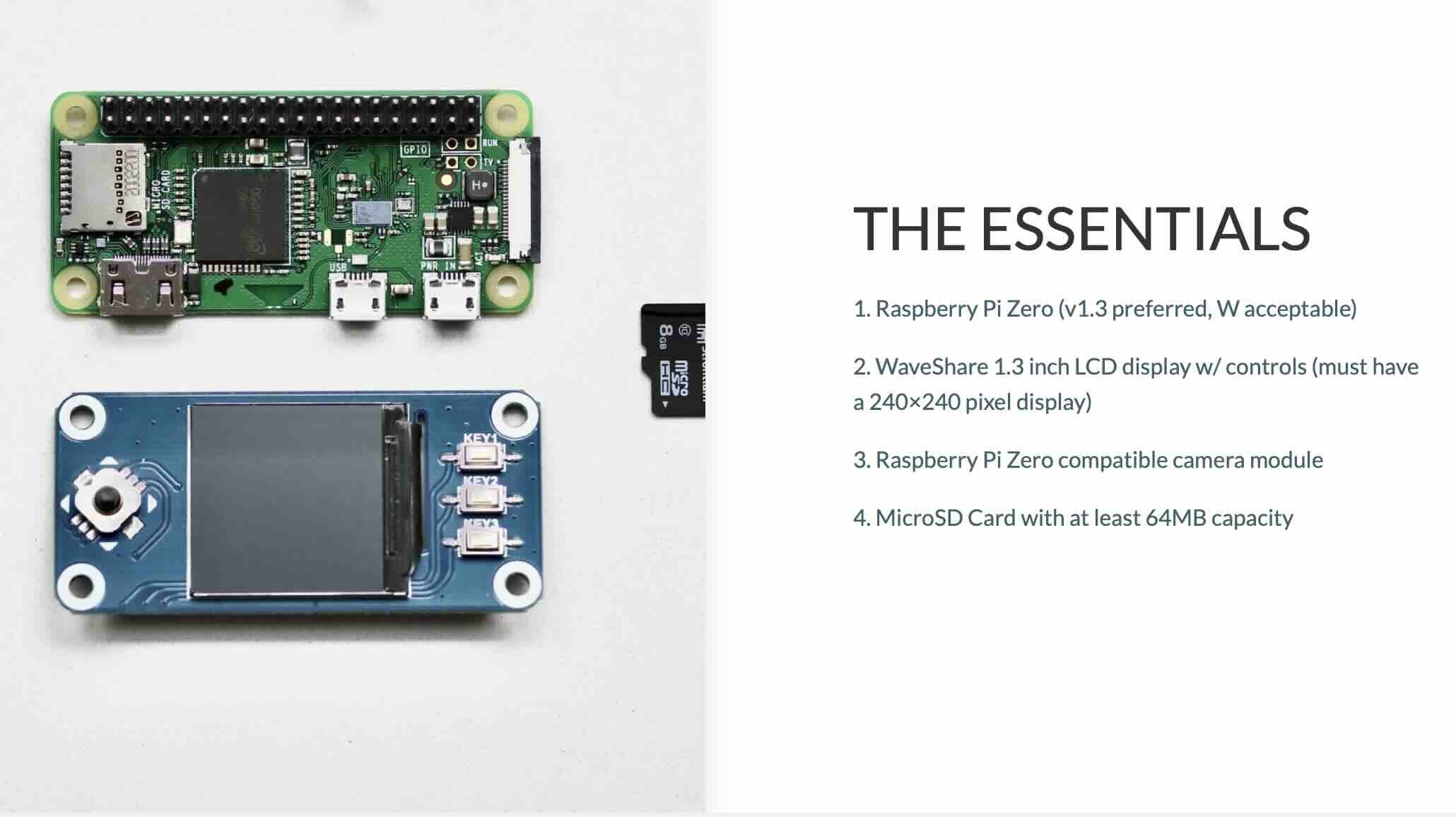
SeedSigner consists of four primary components:
➔ Raspberry Pi Zero (version 1.3) – A single-board computer with no WiFi or Bluetooth hardware. This specific version is critical because later models (the "W" and "2W") include wireless capabilities that defeat the air-gap principle. You can still use these models if you disable or physically remove the wireless components, but the 1.3 is preferred.
➔ Waveshare 1.3" LCD Hat – A small display with physical control buttons. Must be the 240x240 pixel version specifically, as other Waveshare displays won't work with SeedSigner software.
➔ Pi Zero-compatible camera – Typically an inexpensive 5MP camera with an OV5647 sensor. This scans QR codes for transaction data and seed phrase backups.
➔ MicroSD card – Stores the SeedSigner operating system. When you power on the device, the Raspberry Pi boots from this card.
Optional but recommended components include an enclosure (the open-source "Orange Pill" design is popular and 3D-printable), a micro USB cable for power, and potentially GPIO header pins if your Pi Zero doesn't come with them pre-soldered.
Total cost for components ranges from $35 to $80 depending on where you source parts and whether you buy them individually or as a kit. Pre-assembled units from approved vendors typically cost $80-$95 including shipping.
The Privacy Advantage
One of SeedSigner's most compelling features is privacy through obscurity. The components are completely generic—a Raspberry Pi, a camera module, an LCD screen. Nothing about them screams "Bitcoin wallet."
When you buy a Ledger or Trezor, you're purchasing from a company that maintains customer databases. The 2020 Ledger data breach exposed personal information for over one million customers, leading to sophisticated phishing attacks and even reports of physical threats and armed robbery. Your name, address, and the fact that you own Bitcoin hardware became public knowledge.
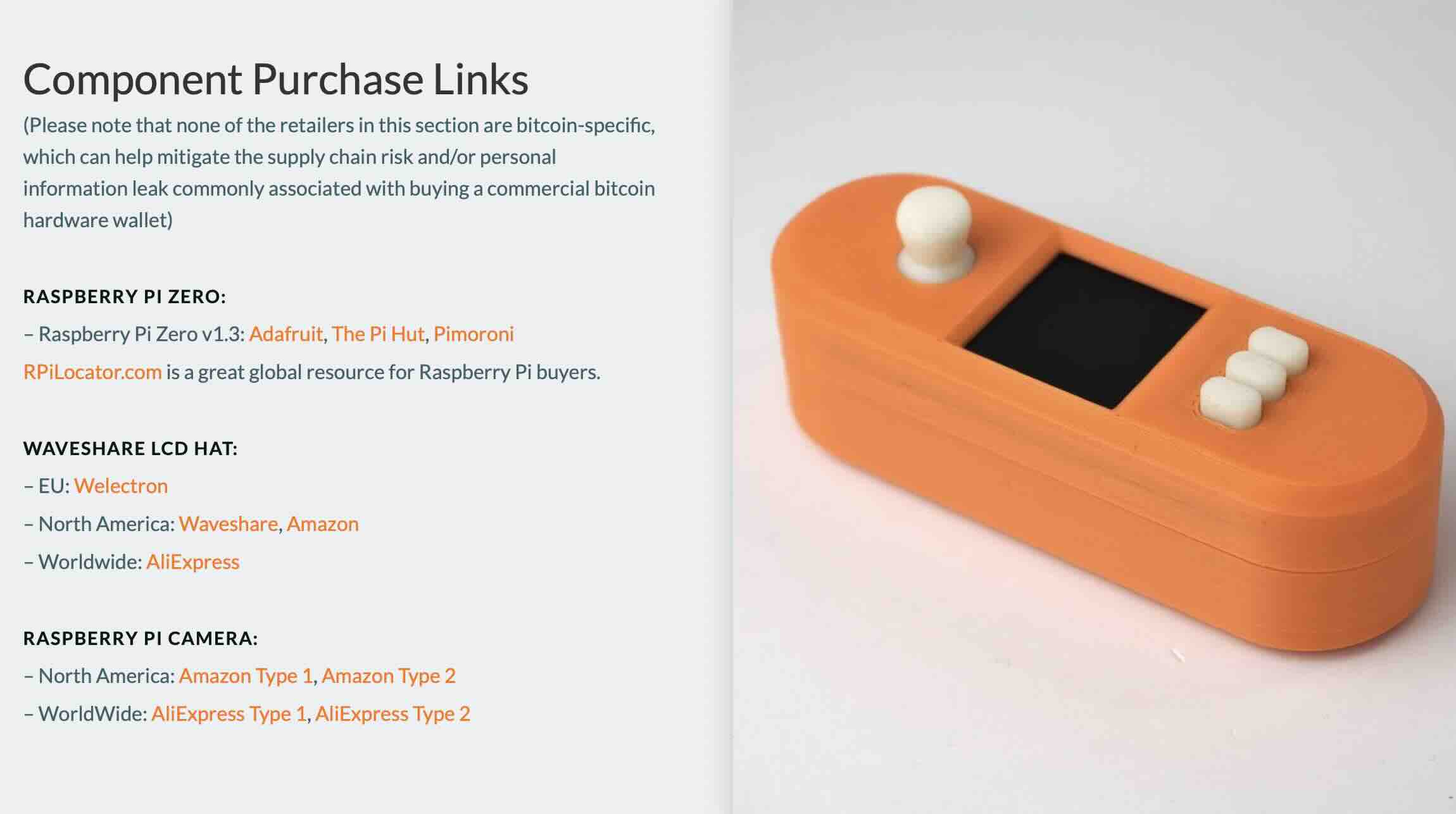
With SeedSigner, you can buy components from mainstream electronics retailers with no indication of Bitcoin involvement. Order a Raspberry Pi from Adafruit, a camera from Amazon, and a display from an electronics wholesaler. Nobody knows you're building a Bitcoin signing device. There's no customer database linking your identity to Bitcoin holdings.
For bitcoiners in jurisdictions where Bitcoin use is discouraged or banned, this matters enormously. SeedSigner provides a path to secure cold storage without exposing yourself to the risks associated with ordering recognizable Bitcoin hardware across borders.
How It Works: The QR Code Dance
Using SeedSigner requires coordination with wallet software on your computer or smartphone—typically Sparrow Wallet, Specter Desktop, Nunchuk, BlueWallet, or Bitcoin Keeper.
Here's the workflow for sending bitcoin:
- Create the transaction in your coordinator software (Sparrow, for example)
- Display the unsigned transaction as a series of QR codes on your computer screen
- Scan the QR codes using SeedSigner's camera
- Review transaction details on the SeedSigner screen—destination address, amount, fees
- Confirm and sign if everything looks correct
- Display the signed transaction as QR codes on the SeedSigner screen
- Scan the signed transaction back into your computer using its webcam
- Broadcast the transaction to the Bitcoin network
This QR exchange process feels cumbersome at first, especially compared to plugging in a USB cable. But it provides several security advantages: the communication is limited in scope and duration, the information is auditable (you can decode QR codes with third-party tools if suspicious), and it's explicitly obvious when data transfer is happening.
The initial setup is similar, you generate or import a seed phrase on the SeedSigner, export your wallet configuration (called an xpub) as a QR code, and scan it into your coordinator software to create a watch-only wallet. From that point, your computer knows your addresses and can construct transactions, but only the SeedSigner can sign them.
Multisig Made Accessible
SeedSigner was specifically designed to make multisignature wallets more accessible and affordable. In a 2-of-3 multisig setup, you need two out of three keys to authorize any transaction. This eliminates single points of failure—lose one key and you can still access your funds; an attacker stealing one key can't steal your bitcoin.
Traditionally, setting up 2-of-3 multisig meant buying three hardware wallets at $60-$150 each. That's $180-$450 just for the hardware. With SeedSigner, you can build three devices for under $150 total.
The software includes native support for Bitcoin Secure Multisig Setup (BSMS), a standardized format for multisig wallet configurations. This means you can create a multisig wallet using SeedSigners and later recover it using other compatible wallets like Sparrow if needed. You're not locked into the SeedSigner ecosystem.
For bitcoiners prioritizing self-sovereignty, being able to build your own multisig setup from generic components represents true independence from commercial hardware wallet manufacturers.
The Build Process: Easier Than You Think
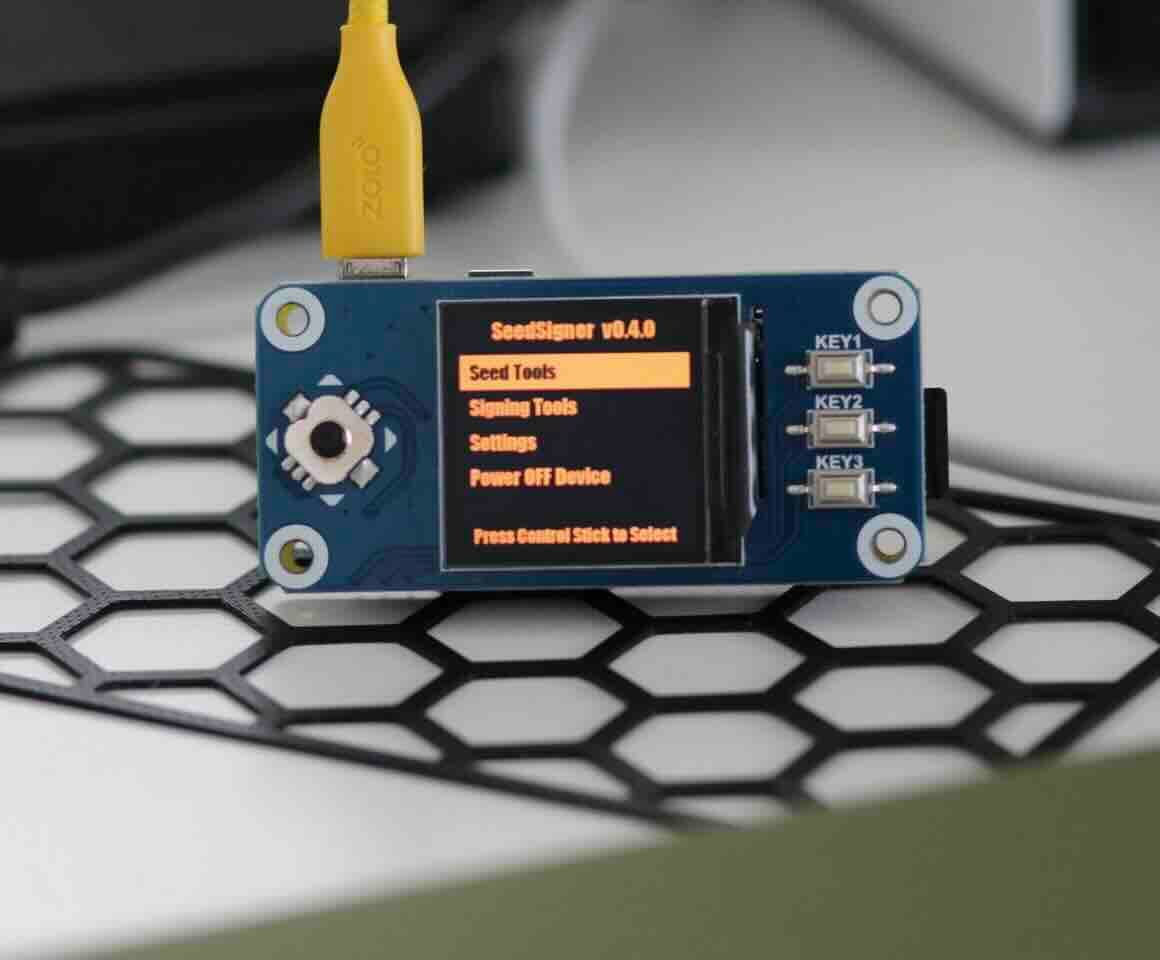
Building a SeedSigner isn't rocket science, but it does require following instructions carefully. The project provides detailed guides with video walkthroughs.
The basic process:
- Source components – Order the Raspberry Pi Zero 1.3, Waveshare LCD, camera, and microSD card
- Verify you have the correct parts – Many builders have accidentally ordered the wrong LCD model
- Download the SeedSigner software image from the official GitHub repository
- Verify the download using GPG signatures (critical for security)
- Flash the image to the microSD card using software like Balena Etcher
- Assemble the hardware – Attach the LCD hat to the Pi Zero's GPIO pins, connect the camera ribbon cable, install into the enclosure if using one
- Insert the microSD card and connect power
The only potentially tricky part is if your Raspberry Pi Zero doesn't come with GPIO header pins pre-soldered. You'll either need basic soldering skills or should buy a board with headers already attached.
Most builders report the entire process taking 30-60 minutes for first-timers. Once you've built one, subsequent units take 15-20 minutes.
Software Verification: Critical But Accessible
Because SeedSigner uses commodity hardware with no secure element chip to verify software authenticity, users must take responsibility for verifying they're running legitimate code. This is the trade-off for using open, general-purpose hardware.
The SeedSigner team provides detailed instructions for software verification using GPG (GNU Privacy Guard). You download the software image, the signature files, and verify that the image was actually signed by the SeedSigner maintainer's PGP key.
This verification process is documented for both Windows and Linux users. While it adds a step compared to commercial hardware wallets, it's also the mechanism that allows you to verify exactly what code is running on your device—something impossible with proprietary hardware.
Starting with version 0.7.0, SeedSigner images are reproducible, meaning anyone can build the software from source code and verify it matches the distributed image byte-for-byte. This provides strong guarantees against hidden backdoors or malicious modifications.
SeedQR: Your Seed Phrase as a QR Code
One of SeedSigner's unique features is SeedQR, a standard for encoding your 12 or 24-word recovery phrase as a QR code.
Why would you want this? Remember, SeedSigner doesn't store your private key. You need to input it every time you use the device. Typing 24 words on a tiny screen with physical buttons is tedious. Scanning a QR code takes seconds.
The SeedSigner interface guides you through transcribing your seed words into a QR code format by hand. This sounds primitive, but it's actually a security feature. The QR code should only exist as a physical object—stamped into metal, printed on durable material, never digitally stored.
When you need to use your SeedSigner, you scan your SeedQR, the device loads the private key into RAM, you complete your transaction, and when you disconnect power, the key vanishes.
This workflow prioritizes physical backups over digital ones—a philosophy that aligns with Bitcoin's emphasis on reducing trust in electronic systems.
Compatible Wallet Software
SeedSigner works with all major Bitcoin wallet coordinators:
- Sparrow Wallet (most popular choice)
- Specter Desktop
- Nunchuk ( Read our Article about Nunchuk )
- BlueWallet (multisig vaults)
- Bitcoin Keeper
- Electrum
Each wallet software handles the QR code exchange slightly differently, but the fundamental process remains the same. Most bitcoiners use Sparrow Wallet as their coordinator due to its robust feature set and excellent SeedSigner integration.
The Limitations You Should Know
SeedSigner isn't perfect. Here are the honest trade-offs:
✷ No secure element chip : Commercial hardware wallets use specialized chips to protect private keys from physical attacks. SeedSigner's security model relies on air-gapping and statelessness instead. If someone compromises your physical backup (your metal seed plate or SeedQR), game over. But the same is true for any hardware wallet if an attacker gets your recovery phrase.
✷ Requires external wallet software : You can't use SeedSigner standalone. You need a computer or smartphone running coordinator software. This adds complexity compared to hardware wallets with built-in screens that display addresses and balances.
✷Boot time : Because it's running a full Linux operating system, SeedSigner takes roughly 45 seconds to boot from power-on to usability. Commercial hardware wallets using microcontrollers boot in seconds.
✷ Software verification responsibility : Users must verify software downloads themselves using GPG. Commercial hardware wallets handle this automatically through secure boot mechanisms. This is more work, but also provides more transparency.
✷ QR code workflow : The QR exchange process is slower than USB or NFC. Some users find it cumbersome, though many appreciate the explicit visibility of what's being communicated.
✷ Camera quality constraints : The inexpensive cameras used with SeedSigner sometimes struggle with reading QR codes in poor lighting or when codes are small. This is usually solvable by adjusting lighting or increasing QR code size in the coordinator software.
Who Should Build a SeedSigner?
SeedSigner appeals to specific types of bitcoiners:
- Privacy-focused holders who want to avoid customer databases and supply chain surveillance
- DIY enthusiasts comfortable with basic electronics assembly
- Multisig users looking for affordable redundancy across multiple signing devices
If you want plug-and-play simplicity, a Ledger or BitKey might suit you better. If you need enterprise-grade support, Coldcard or Foundation Passport offer that. But for users who value building and verifying their own security tools—who want to understand exactly what they're trusting, SeedSigner represents a unique option.
The Bigger Context: Retail Hardware Wallets vs. DIY
Most hardware wallets are essentially single-purpose microcontrollers with custom firmware. They do one thing: be a hardware wallet. This focused design allows tight security but creates vendor lock-in and requires trusting the manufacturer.
SeedSigner inverts this model by using general-purpose hardware running open-source software. The Raspberry Pi Zero is a complete Linux computer—the same architecture running Bitcoin nodes, web servers, and countless other applications. This creates a larger attack surface than a dedicated microcontroller, but also enables complete auditability.
The key insight is that SeedSigner's security comes from eliminating persistent state (the amnesiac design) and maintaining an air gap, not from specialized hardware protections. Your private key only exists in the device's RAM while you're actively using it, and the device has no ability to communicate that key to the outside world except by displaying it as a QR code.
This is fundamentally different from the security model of retail hardware wallets, which secure stored keys using specialized chips. Neither approach is objectively superior—they make different trade-offs for different threat models.
Real-World Adoption and Development
The SeedSigner project is entirely volunteer-driven and accepts no venture capital funding. Development happens in the open on GitHub, with contributors from around the world improving the codebase.
The project has deliberately avoided commercialization. There's no SeedSigner company selling devices. Instead, the team maintains a list of community vendors who sell kits, with the expectation that sellers donate a portion of revenue back to the project's development fund.
This non-commercial approach aligns with Bitcoin's ethos but comes with trade-offs. There's no marketing budget, no dedicated customer support team, and feature development happens at the pace of volunteer contributions. The flip side is complete independence from corporate interests and alignment with Bitcoin's cypherpunk origins.
The software continues to evolve with regular releases adding features like BIP85 child seed generation, address verification, message signing, support for various wallet types, and compatibility improvements with different coordinator software.
The Verdict: Freedom Through Complexity
SeedSigner succeeds at what it sets out to do: provide a completely transparent, verifiable, privacy-preserving Bitcoin signing device that anyone can build. It makes multisig more accessible and eliminates trust in hardware manufacturers.
But this comes at a cost. You need to invest time learning the system, verifying software, and understanding the security model. The QR workflow is slower than USB. The boot time is longer. You're responsible for more of the security yourself.
These aren't bugs—they're the inevitable consequences of prioritizing sovereignty over convenience.
Commercial hardware wallets optimize for user experience. They handle complexity behind polished interfaces and ask users to trust the manufacturer. SeedSigner optimizes for transparency and verifiability. It exposes more of the underlying Bitcoin technology and asks users to take responsibility for understanding it.
For some bitcoiners, this trade-off is obvious. The ability to build your own hardware wallet from commodity components, verify exactly what code is running, and maintain complete privacy during the acquisition process represents true self-sovereignty. The inconveniences are minor compared to the peace of mind from eliminating trust.
For others, the complexity isn't worth it. Established hardware wallets from reputable manufacturers provide excellent security with much less friction.
Both approaches are valid. The existence of SeedSigner ensures bitcoiners have a genuine choice—and choice, ultimately, is what sovereignty is about.
For more information, build guides, and software downloads, visit seedsigner.com or explore the project on GitHub.
