


When it comes to keeping your crypto safe, there's one name that keeps popping up in every conversation: Ledger. But with so many products now in their lineup, from the budget-friendly Nano S Plus to the premium Ledger Stax, you might be wondering which one's right for you. Let's dive deep into everything Ledger offers and help you make the smartest choice for your digital assets.
What is Ledger?
Ledger is a French company founded in 2014 by a team of security experts who saw a massive gap in the crypto world: people needed a way to store their digital assets that was actually, genuinely secure. The founders—Eric Larchevêque, Nicolas Bacca, and others—brought their expertise from the smart card and embedded security industries to create something revolutionary.
Fast forward to today, and Ledger has become the gold standard in hardware wallet security. They've sold over 7 million devices worldwide, secured roughly 20% of the world's crypto assets, and expanded to over 700 employees across 8 global offices. Not bad for a startup that began in a Parisian office!
The Story Behind Ledger
Here's what makes Ledger's story compelling: they didn't just create a product; they built an entire security ecosystem. The founders understood that cryptocurrency storage wasn't just about creating a fancy USB stick. It required military-grade security chips, custom operating systems, and an obsessive focus on protecting users from both digital and physical attacks.
Their first product, the original Ledger Nano, was revolutionary. It introduced the concept of an "air-gapped" environment for crypto transactions—meaning your private keys never touch the internet. Ever. This principle remains at the core of every Ledger device today.
Ledger's Product Lineup: Something for Everyone
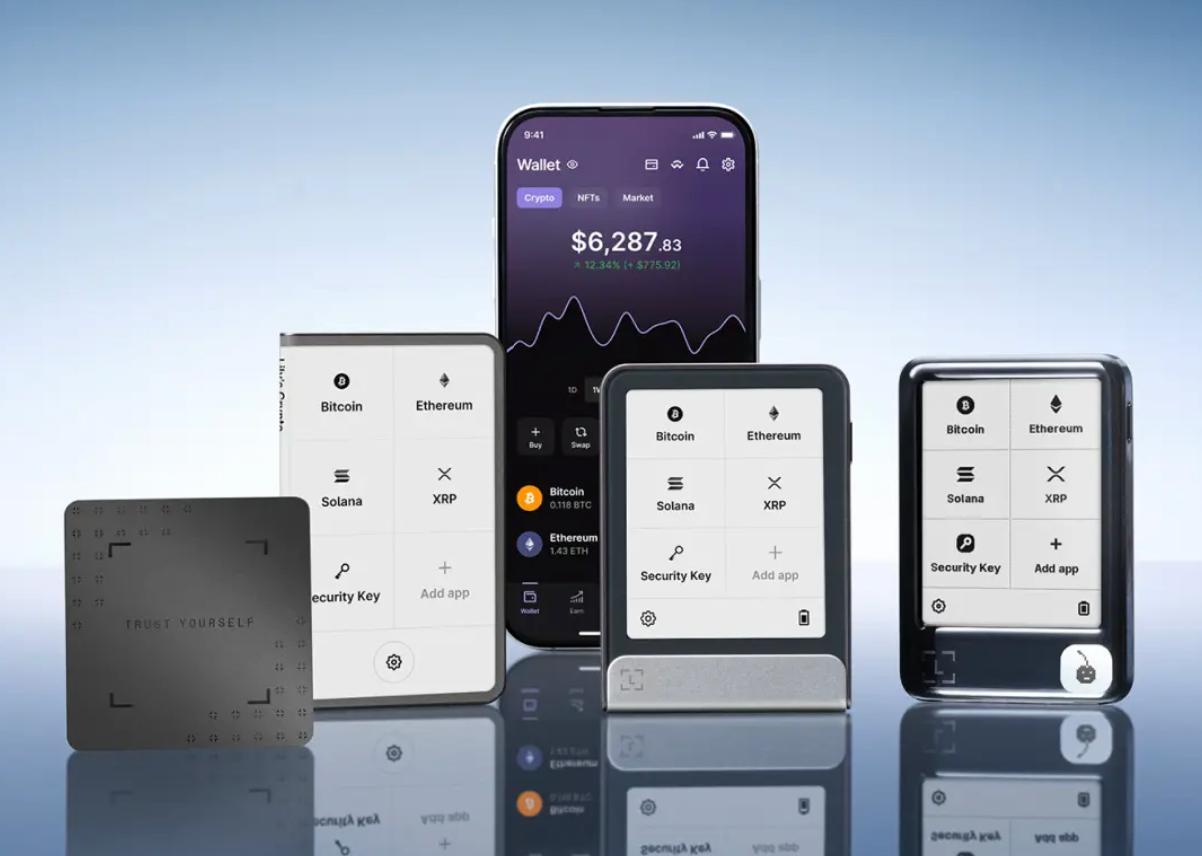
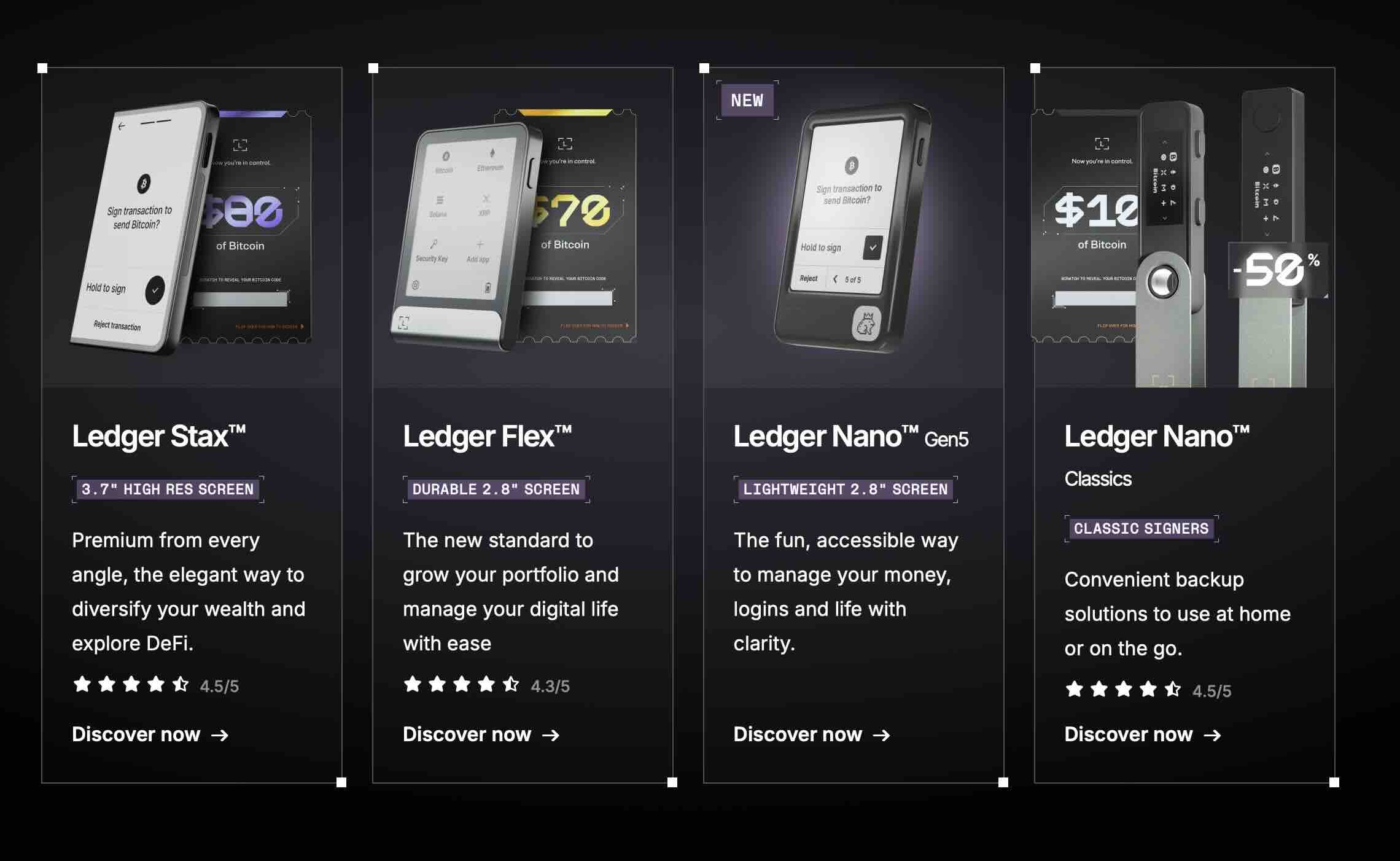
Ledger has evolved from offering just one device to a complete range of products. Let's break down what they offer:
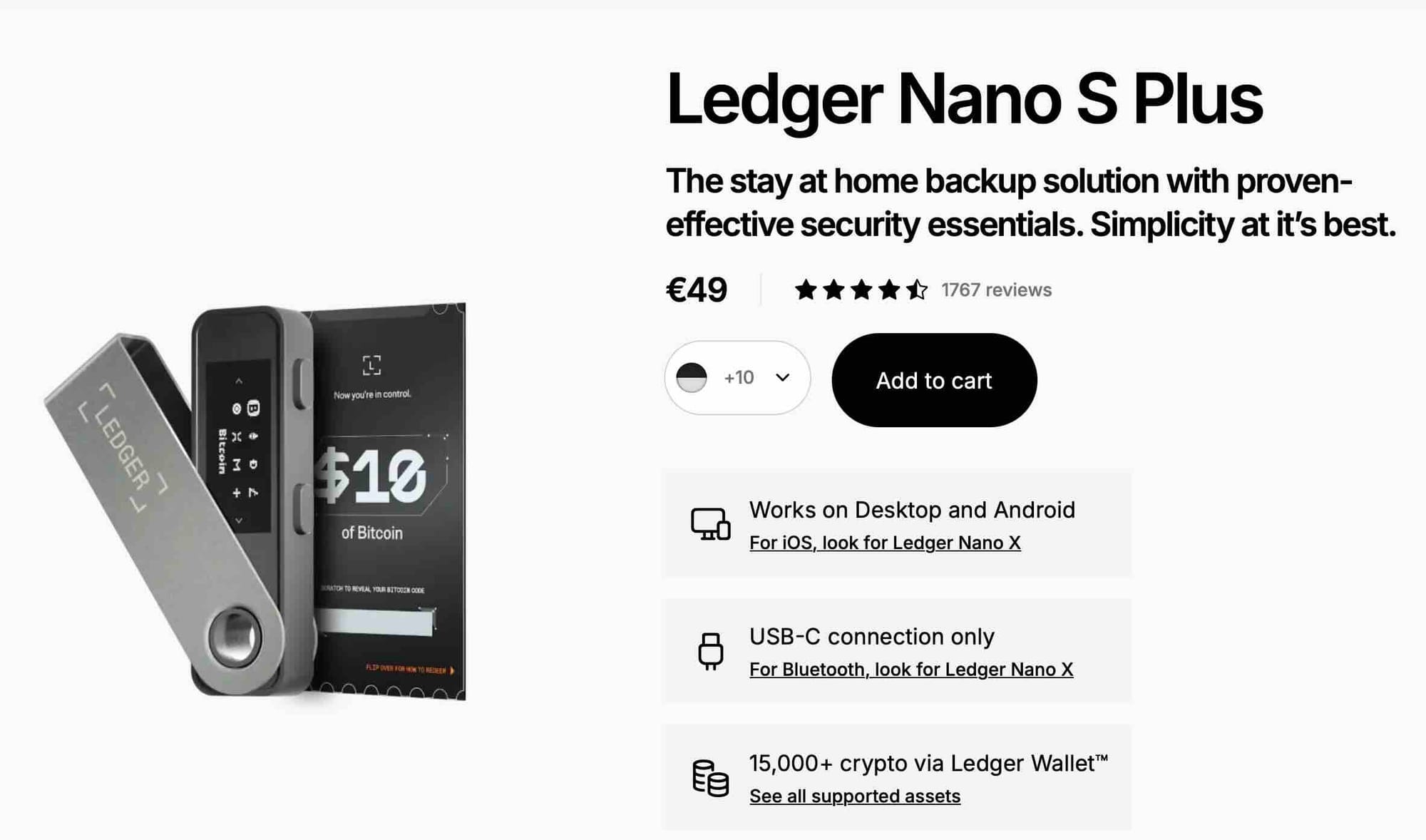
Ledger Nano S Plus ($79)
The entry-level champion for anyone starting their crypto journey.
The Nano S Plus is the perfect introduction to hardware wallets. It's compact, affordable, and packs serious security features. It supports up to 100 coin applications installed simultaneously, meaning you can manage up to 100 different cryptocurrencies with their associated tokens—all from one device.
What makes it great:
- Battery-free design (no charging needed)
- USB-C connectivity for modern devices
- Compatible with desktop and Android smartphones
- Larger screen than its predecessor for easier transaction verification
- Over 5,500 supported cryptocurrencies and tokens
Who it's for: Crypto beginners, anyone on a budget, or those who prefer desktop-based crypto management and don't need Bluetooth connectivity.
Ledger Nano X ($149)
The mobile-friendly powerhouse that goes wherever you do.
The Nano X takes everything great about the Nano S Plus and adds mobility to the mix. It features Bluetooth connectivity, allowing it to pair with iOS and Android smartphones for managing crypto on the go through the Ledger Live app.
What makes it great:
- Bluetooth-enabled for seamless mobile management
- Built-in battery for portable use
- Same robust security as all Ledger devices
- Supports 100+ applications simultaneously
- Perfect for active traders who need access anywhere
Who it's for: Mobile-first users, active crypto traders, anyone who wants the flexibility to manage their portfolio from their smartphone without sacrificing security.
Ledger Flex ($249)
The modern standard with touchscreen convenience.
Ledger Flex launched in July 2024 as the new standard for Ledger devices, featuring a 2.8-inch E Ink touchscreen that makes navigating crypto transactions feel as natural as using your smartphone.
What makes it great:
- Large, clear E Ink touchscreen for easy navigation
- Tap-to-approve transactions—no more button pressing
- Customizable lock screen (display your favorite NFT or image)
- NFC capabilities for tap-to-authenticate logins
- Supports both Bluetooth and USB-C connectivity
- Weeks of battery life on a single charge
Who it's for: Users who want modern convenience without paying premium prices, NFT collectors who appreciate visual interfaces, anyone upgrading from older button-based wallets.
Ledger Stax ($399)
The absolute premium designed by iPod creator Tony Fadell.
The Ledger Stax features a curved E Ink display and was designed in partnership with Tony Fadell, bringing that same level of industrial design excellence that made the iPod iconic.
What makes it great:
- Stunning 3.7-inch curved E Ink display that wraps around the device
- Wireless Qi charging (just drop it on a charging pad)
- Magnetic stackable design—name multiple devices and stack them
- Edge-to-edge touchscreen with always-on lock screen customization
- Most immersive and premium user experience in the lineup
- Thinnest profile of any Ledger device
Who it's for: Serious investors with substantial holdings, NFT enthusiasts who want to showcase their collections, anyone who values premium design and cutting-edge features, collectors managing multiple wallets.
What Sets Ledger Apart: Security That Actually Works
Let's talk about what really matters: security. Because if your hardware wallet isn't secure, what's the point?
The Secure Element Chip
Every Ledger device is powered by an industry-leading Secure Element chip certified to CC EAL6+, the same level of security used in passports and credit cards. This isn't just marketing speak—this chip is physically designed to resist tampering, side-channel attacks, and physical extraction attempts.
Your private keys are generated inside this chip and never leave it. Even if someone steals your Ledger, they can't extract your keys without destroying the device in the process.
Ledger OS (BOLOS)
Ledger's proprietary operating system, BOLOS (Blockchain Open Ledger Operating System), isolates different applications from each other. This means even if one app is somehow compromised, the rest of your system remains secure. It's like having multiple vaults instead of one big vault—compartmentalized security at its finest.
Clear Signing Technology
Here's where Ledger really shines for modern crypto users. Ledger's Clear Signing feature translates complex transaction data into human-readable details directly on your device's screen. No more signing mysterious code and hoping it's legit—you see exactly what you're approving before you approve it.
This is huge for preventing phishing attacks and malicious smart contract approvals, which account for a massive portion of crypto thefts today.
The Trusted Display
Your Ledger's screen is driven directly by the Secure Element chip, not by your potentially compromised computer or phone. This means what you see on your Ledger screen is exactly what you're signing—no screen spoofing possible.
Advantages: Why Choose Ledger?
True Self-Custody
With Ledger's non-custodial wallets, you fully own and control your crypto. No third party can freeze your account, limit your withdrawals, or lose your funds in a hack. You're the bank. You're in control.
Massive Crypto Support
Ledger supports over 5,500 cryptocurrencies and tokens. From Bitcoin and Ethereum to the newest DeFi tokens, meme coins, and NFTs across multiple blockchains—if it's legitimate crypto, Ledger probably supports it.
Recovery Options
Lost your device? Dropped it in water? No panic necessary. Your crypto is stored on the blockchain, not on the device itself. As long as you have your 24-word Secret Recovery Phrase safely stored, you can restore everything to a new Ledger device.
For those worried about managing recovery phrases, Ledger offers Ledger Recover—a subscription service that securely backs up your phrase through identity verification, though this remains optional for users who prefer traditional recovery methods.
Ledger Live: Your Command Center
The Ledger Live app transforms your hardware wallet from a security device into a complete crypto management platform. You can:
- Buy crypto with fiat through integrated partners
- Swap between cryptocurrencies
- Stake assets to earn rewards
- Track your portfolio in real-time
- Access thousands of Web3 dApps securely
- Manage NFTs with full visual interfaces
All while keeping your private keys safely offline on your Ledger device.
Beyond Crypto: Digital Identity Protection
Newer Ledger devices (Flex and Stax) introduce the Ledger Security Key app. This allows you to use your Ledger for Two-Factor Authentication and passwordless logins via NFC tap on platforms like Google, Amazon, Binance, Coinbase, and many social media sites. Your Ledger becomes your master key to your entire digital life.
Built for the Long Haul
Ledger devices are designed to last. No planned obsolescence here. The Nano S Plus and Nano X are battery-free, and the Flex and Stax batteries are rated for weeks of use per charge. Regular firmware updates ensure your device stays secure against emerging threats, and Ledger's decade-long track record speaks to their commitment to supporting their products long-term.
Security Best Practices
Even the best hardware wallet requires smart usage. Here are the golden rules:
Rule #1: Buy Only From Official Sources
Never, ever buy a used Ledger or purchase from unauthorized resellers. Always buy from Ledger's official website or verified retailers like Amazon (from Ledger Official store). Tampered devices are rare but devastating.
Rule #2: Your Recovery Phrase is Sacred
Your 24-word recovery phrase is the master key to your crypto. Write it down on the card Ledger provides, store it somewhere safe (like a fireproof safe), and never, EVER store it digitally or share it with anyone. Ledger will never ask for it. If someone claiming to be from Ledger asks for it, it's a scam.
Rule #3: Verify Everything on the Device Screen
Always verify transaction details on your Ledger's screen before approving. If your computer says one thing and your Ledger shows something different, trust the Ledger and cancel the transaction.
Rule #4: Set a Strong PIN
Your device requires a PIN to access. Choose something secure—not 1234. After three wrong attempts, the device wipes itself as a security precaution.
Rule #5: Be Phishing-Aware
Hardware wallets protect against many attacks but can't protect you from social engineering and scams. If someone's pressuring you to transfer crypto urgently, it's probably a scam. Take your time, verify independently, and never trust unsolicited messages about "urgent" security updates.
The Honest Drawbacks
No product is perfect. Here's what you should know:
Learning Curve: If you're completely new to crypto, hardware wallets can feel intimidating at first. The setup process requires careful attention, and understanding concepts like gas fees, transaction approval, and network selection takes time. That said, Ledger Live's interface is about as user-friendly as it gets.
Physical Device Dependency: You need your Ledger to approve transactions. Forget it at home? You can't access your crypto until you return. This is actually a feature—it prevents remote theft—but it requires planning.
Not Free: Hardware wallets are an investment. If you're only holding $50 in crypto, spending $79+ on a wallet might seem excessive. However, as your holdings grow, that one-time cost becomes trivial compared to the security you gain.
Recovery Phrase Responsibility: You are solely responsible for your recovery phrase. There's no "forgot password" option. If you lose it and your device breaks, your crypto is gone forever. This isn't a Ledger problem—it's how non-custodial wallets work—but it's a serious responsibility.
Comparing the Models: Which One Should You Buy?
Choose the Nano S Plus if: You're new to crypto, primarily use desktop computers, want proven security at the lowest price, and don't need mobile connectivity.
Choose the Nano X if: You're mobile-first, want Bluetooth connectivity for on-the-go management, and prefer the flexibility of smartphone access without stepping up to touchscreen models.
Choose the Flex if: You want the modern touchscreen experience, appreciate larger displays for better transaction visibility, and want mid-range pricing between the Nano series and premium Stax.
Choose the Stax if: You're a serious investor with substantial holdings, manage multiple wallets or large NFT collections, value premium design and cutting-edge features, or want the absolute best user experience money can buy.
Budget reality check: For most users, the Nano S Plus or Nano X provides everything you need. The Flex and Stax offer luxury experiences but aren't necessary for security—all Ledger devices share the same core security architecture.
Real Talk: Is Ledger Worth It?
After a decade in business, over 7 million devices sold, and securing 20% of the world's crypto assets, Ledger has proven itself. They're not perfect—no company is—but they've consistently prioritized security, transparency, and user experience.
The peace of mind alone is worth the investment. Exchange hacks happen. Phishing attacks are constant. Hot wallet vulnerabilities are discovered regularly. A hardware wallet is crypto insurance that actually works.
Setting Up Your Ledger: Quick Overview
- Unbox and connect your device to your computer or smartphone
- Install Ledger Live from Ledger's official website
- Initialize your device by following on-screen instructions
- Write down your 24-word recovery phrase and store it safely
- Set your PIN code
- Install cryptocurrency apps you need through Ledger Live
- Transfer crypto from exchanges to your Ledger addresses
The entire process takes 15-30 minutes and is guided step-by-step in the Ledger Live app. The newer touchscreen models (Flex and Stax) make this even easier with interactive on-device guidance.
Final Verdict
Ledger has earned its reputation as the industry leader in hardware wallet security. From the affordable Nano S Plus to the premium Stax, each device delivers uncompromising security wrapped in increasingly sophisticated user experiences.
If you're serious about crypto—whether you hold $500 or $5 million—a hardware wallet isn't optional; it's essential. And in the hardware wallet space, Ledger is the standard against which all others are measured.
Your crypto security is only as strong as your weakest link. Don't let that weak link be where you store your assets. Get a Ledger, follow best practices, and sleep soundly knowing your digital wealth is actually secure.
Frequently Asked Questions
Q: What happens if Ledger the company goes out of business?
A: Your crypto remains safe. Ledger devices work independently of the company. Your recovery phrase is compatible with other BIP39-compatible wallets. Even if Ledger disappeared tomorrow, you could restore your assets using your recovery phrase on alternative wallets.
Q: Can I use one Ledger device for multiple cryptocurrencies?
A: Absolutely! All Ledger devices support thousands of cryptocurrencies. You can install up to 100 apps simultaneously on Nano S Plus and Nano X, managing different crypto assets from a single device.
Q: What if I forget my PIN?
A: After three incorrect PIN attempts, your Ledger wipes itself for security. However, you can restore everything using your 24-word recovery phrase on the same device or a new one. This is why securely storing your recovery phrase is crucial.
Q: Is Bluetooth on Nano X safe?
A: Yes. Bluetooth only transmits already-encrypted public data. Your private keys never leave the Secure Element chip, Bluetooth or not. The encryption is end-to-end, making interception useless to attackers.
Q: Do I need to keep my Ledger connected to my computer all the time?
A: No. You only connect your Ledger when you want to send crypto or approve transactions. For simply receiving crypto, you just need to share your wallet address—the device doesn't need to be connected.
Q: How often should I update my Ledger's firmware?
A: Whenever Ledger releases security updates, which they announce through Ledger Live. Updates are straightforward and guided, taking just a few minutes. These updates ensure your device stays protected against newly discovered vulnerabilities.
Q: Can someone hack my Ledger remotely?
A: No. Your private keys never touch the internet and remain locked in the Secure Element chip. Even if your computer is compromised with malware, attackers can't access your keys. You must physically approve transactions on the device itself.
Q: What's the difference between Ledger Nano X and Ledger Flex?
A: The Nano X uses a small OLED screen with two physical buttons and costs $149. The Flex features a large 2.8-inch E Ink touchscreen for easier navigation and costs $249. Both offer the same security; Flex provides a more modern user experience.
Q: Should I buy multiple Ledger devices?
A: Many advanced users do. One for daily use, one as a backup, and perhaps another for cold storage of long-term holdings. The Stax even features magnetic stacking designed for users managing multiple devices. However, one device with a properly stored recovery phrase is sufficient for most users.
Q: Are NFTs safe on Ledger?
A: Yes. Ledger supports NFT storage and management through Ledger Live. You can view, send, and receive NFTs directly through the app, with all transactions requiring physical approval on your Ledger device. The Flex and Stax models offer particularly good NFT experiences with their larger screens.
Q: What's Ledger Recover and do I need it?
A: Ledger Recover is an optional paid subscription service that backs up your recovery phrase through encrypted shards stored with third-party custodians. You can restore access by verifying your identity with ID and selfie. It's not necessary—traditional recovery phrases work fine—but some users prefer this option for additional peace of mind.
Q: Can I use my Ledger with DeFi platforms?
A: Absolutely. Ledger integrates with popular Web3 wallets like MetaMask, and you can access DeFi platforms through Ledger Live's built-in dApp browser. Your Ledger signs all transactions, keeping your private keys secure while you interact with decentralized protocols.
Q: How long does a Ledger device last?
A: Years, potentially decades with proper care. The Nano S Plus and Nano X have no batteries to degrade. The Flex and Stax batteries are designed for hundreds of charge cycles. Ledger provides firmware updates for years after release, and their track record shows strong long-term device support.
Q: What if my Ledger gets stolen?
A: Your crypto is safe as long as your PIN and recovery phrase remain secure. A thief can't access your funds without your PIN (and the device wipes after three wrong attempts). Get a new Ledger, restore from your recovery phrase, and optionally transfer to new addresses for complete peace of mind.
Q: Can I share my Ledger with family members?
A: Technically possible but not recommended for security reasons. Each person should have their own device. However, you could give family members access to your recovery phrase in secure ways (like through inheritance planning services) so they can access funds if something happens to you.
Q: Does Ledger report my transactions to tax authorities?
A: No. Ledger doesn't track your transactions or report anything to anyone. However, exchanges where you buy or sell crypto may report to tax authorities in some jurisdictions. Your Ledger usage itself is completely private.
Q: Which Ledger should I buy as a complete beginner?
A: Start with the Nano S Plus ($79). It provides all the security you need at the lowest price point. As you become more comfortable with crypto and potentially accumulate larger holdings, you can always upgrade to models with more features later—your recovery phrase works across all Ledger devices.
