


Remember being a teenager and hearing you couldn't smoke cigarettes? For many, that prohibition didn't make cigarettes less appealing it made them irresistible.
The forbidden fruit becomes infinitely more tempting simply because someone said "no." This timeless psychological phenomenon is playing out in real-time across Uganda, where the government's threats to block a messaging app called BitChat have inadvertently transformed it into the country's fastest-growing application.
"We know how it can be made not to work. So don't be excited by bitchat. It's a small thing" _Ugandan politician.
— Bitchat Community (@BitchatMe_) January 6, 2026
Without the right to be left alone, the right to decide for yourself disappears. This is why we need bitchat. pic.twitter.com/b6tO6CWUX5
Over 400,000 Ugandans downloaded BitChat in just days after opposition leader Bobi Wine encouraged citizens to install it ahead of the January 15, 2026 presidential election.
When Uganda's Communications Commission Executive Director Nyombi Thembo publicly warned that his team could "switch off such platforms," declaring BitChat was "a small thing" they knew how to disable, the response was explosive. Downloads surged. Interest skyrocketed. The regime's attempt at intimidation backfired spectacularly.
The story unfolding in Uganda isn't just about one app or one election, it's about the fundamental tension between centralized control and decentralized technology, between censorship and free communication, between what governments can technically do and what people will simply refuse to accept.
What Is BitChat? Understanding the Unstoppable Messenger
BitChat is a peer-to-peer encrypted messaging application that fundamentally reimagines how digital communication works. Created by Jack Dorsey, co-founder of Twitter and Block Inc., BitChat enables encrypted message transmission via Bluetooth mesh networks without requiring internet connections, cellular service, user accounts, or central servers.
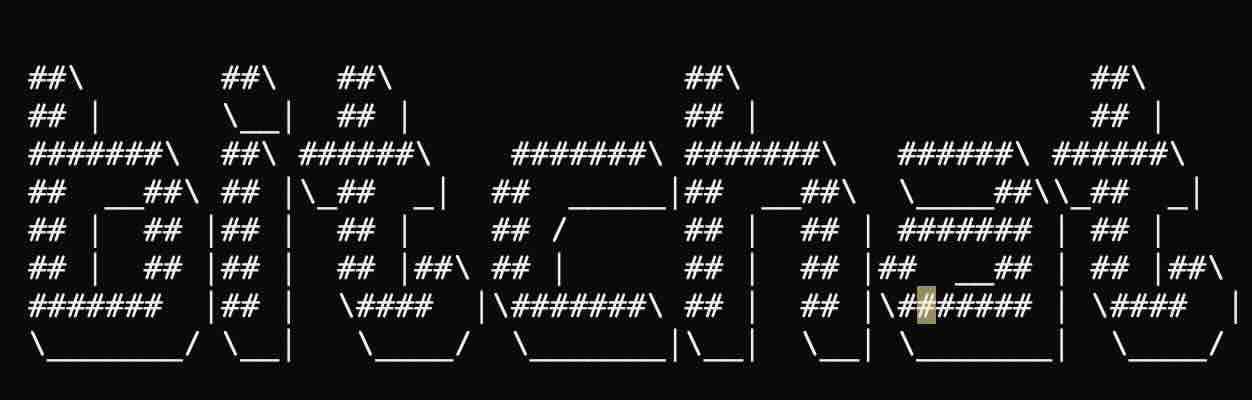
Think of it as communication that returns to its most basic form: direct, device-to-device conversations that don't depend on any infrastructure controlled by corporations or governments.
The Dual Architecture: Bluetooth + Nostr
BitChat uses a hybrid messaging architecture with two complementary transport layers: local Bluetooth mesh for offline communication and the Nostr protocol for internet-based global messaging.
Local Bluetooth Mesh:
- Direct peer-to-peer communication within Bluetooth range (10-30 meters)
- Multi-hop relay allowing messages to "hop" through nearby devices (maximum 7 hops)
- Works completely offline in disaster scenarios or during internet shutdowns
- Uses Noise Protocol for end-to-end encryption with forward secrecy
- Binary protocol optimized for Bluetooth Low Energy constraints
Nostr Integration:
- Location-based channels using geohash coordinates
- Global reach when internet is available
- Decentralized relay system with no central servers
- NIP-17 encryption for private messages over Nostr
- Allows users to "teleport" to chat rooms anywhere in the world
 Nakamoto Builder
How It Actually Works
When you open BitChat, your phone becomes both a messenger and a relay node. Each user's device acts as both a client and a relay node, using multi-hop Bluetooth relays to pass encrypted messages from device to device.
Here's the process:
- Automatic Discovery: Your phone continuously broadcasts and scans for nearby BitChat users via Bluetooth Low Energy
- Encrypted Handshake: When connecting for private messages, devices perform a secure handshake using the Noise Protocol (XX pattern) with X25519 key exchange
- Message Fragmentation: Messages are broken into 500-byte fragments to fit within Bluetooth transmission limits
- Multi-hop Routing: If the recipient isn't in direct range, your message "hops" through other BitChat users' phones until it reaches its destination
- End-to-End Encryption: All messages use AES-256-GCM encryption, with room-based password protection derived via Argon2id
- Store and Forward: Messages are cached for offline peers and delivered when they reconnect
The beauty of this system is its resilience. There's no single point of failure. The app is fully decentralized with no central servers, accounts, email addresses, phone numbers to register, or infrastructure dependencies.
Key Features That Make BitChat Different
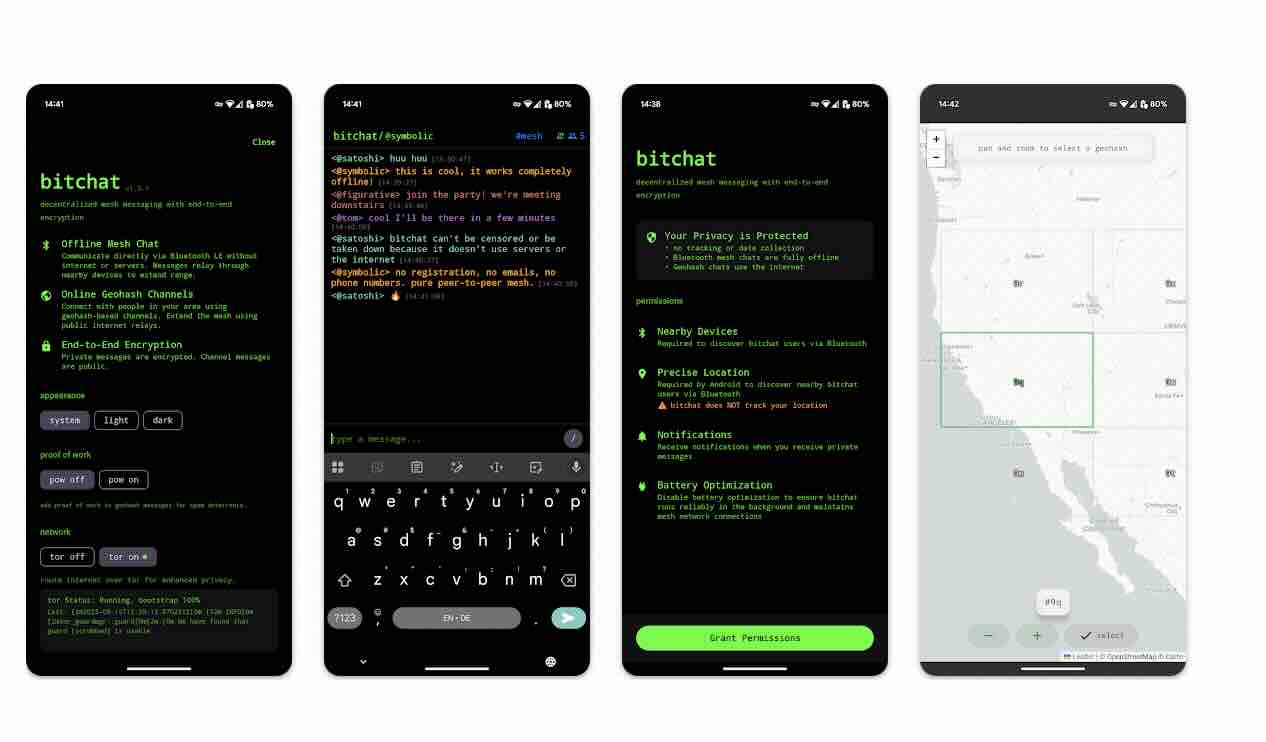
- IRC-Style Interface: Familiar command system (/join, /msg, /who) reminiscent of classic Internet Relay Chat
- Location Channels: Join geographic chat rooms based on your location (neighborhood, city, region, country) or "teleport" to any geohash in the world
- No Registration Required: No phone number, no email, no account—just download and start chatting
- Password-Protected Channels: Create private group chats secured with passwords
- Panic Mode: Triple-tap the logo to instantly wipe all data from your device
- Cross-Platform Compatible: Full protocol compatibility between iOS and Android versions
- Battery Optimization: Adaptive scanning and power management to conserve battery life
- Message Compression: LZ4 compression for messages over 100 bytes
Why Uganda? Understanding the Political Context
Uganda's interest in BitChat isn't coincidental—it's born from painful experience with government-imposed communication blackouts.
A Pattern of Digital Repression
During the 2016 election, President Yoweri Museveni blocked internet and social media access for the entire population, and again in 2021, with the internet blockage lasting approximately four days.
These shutdowns serve multiple purposes for authoritarian regimes:
- Prevent opposition coordination and mobilization
- Hinder citizens from verifying election results in real-time
- Limit documentation of election irregularities or violence
- Control the narrative by restricting information flow
Opposition leader Bobi Wine understands this pattern intimately. In late December 2025, he urged Ugandans to download BitChat, warning that authorities were "plotting an internet shutdown in the coming days, like they have done in all previous elections."
The Government's Response: A Spectacular Backfire
Uganda Communications Commission Executive Director Nyombi Thembo claimed his team has the technical know-how to turn off BitChat, stating "We know how it can be made not to work" and calling it "a small thing".
This dismissive threat had the opposite of its intended effect. Search interest for BitChat in Uganda exploded from 0 to 100 on Google Trends the day after Wine's call to action. Within days, approximately 1% of Uganda's entire population had installed the app.
The regime's attempt to simultaneously downplay BitChat while threatening to block it revealed their fundamental misunderstanding of both the technology and human psychology. You cannot dismiss something as trivial while also claiming you need to shut it down—the contradiction undermines both messages.
The Developer's Defiant Response
BitChat developer "Calle" responded to the government's threats by declaring "you can't stop bitchat. you can't stop us" and inviting every Ugandan developer to join the global open source movement.
This response highlights a critical reality: BitChat isn't a company that can be intimidated, regulated, or shut down. It's open-source software, released into the public domain, maintained by a distributed community of developers worldwide. There's no CEO to pressure, no corporate headquarters to raid, no single point of control.
Installation Guide: Getting Started with BitChat
Given the urgency for Ugandans and others in similar situations, here's a comprehensive guide to installing and using BitChat.
For Android Users
Method 1: Google Play Store (Easiest)
 Verse Communication PBC
- Open Google Play Store on your Android device
- Search for "BitChat" or "BitChat Mesh"
- Download and install the official app
- Requires Android 8.0 (API 26) or higher
Method 2: Direct APK Download (Works without Play Store)
- Visit: https://github.com/permissionlesstech/bitchat-android/releases
- Download the latest .apk file to your phone
- You may need to enable "Install from unknown sources" in Settings > Security
- Open the downloaded .apk file to install
- Grant necessary permissions when prompted
Method 3: Alternative APK Sources
- Download from Uptodown: https://bitchat.en.uptodown.com/android
- APKMirror also hosts verified versions
For iOS Users
Method 1: App Store (Recommended)
 permissionless tech, llc
- Open the App Store on your iPhone or iPad
- Search for "BitChat Mesh"
- Download and install
- Requires iOS 16.0 or later
Method 2: TestFlight Beta (For testing new features)
- Install TestFlight from the App Store if you don't have it
- Follow BitChat's TestFlight invitation link (when available)
- Note: TestFlight slots are limited to 10,000 users
Method 3: Build from Source (For Developers)
- Install Xcode from Mac App Store
- Clone the repository: https://github.com/permissionlesstech/bitchat
- Open the project in Xcode
- Sign with your Apple Developer account
- Build and run on your device
For macOS Users
- Open App Store on your Mac
- Search for "BitChat Mesh"
- Download and install
- Requires macOS 13.0 or later
Initial Setup and Configuration
Once installed, follow these steps:
- First Launch: Open BitChat for the first time
- Set Username: Choose a username or accept the randomly generated one
- Grant Permissions:
- Enable Bluetooth access (essential for mesh networking)
- Enable Location access (required for discovering nearby users)
- Disable Battery Optimization (recommended for background operation)
- Automatic Discovery: BitChat immediately starts scanning for nearby users
- Start Chatting: You're ready to communicate!
Essential Permissions Explained
Bluetooth: Core functionality—required for device-to-device communication
Location: Necessary for Bluetooth device discovery on Android; BitChat doesn't track your location
Notifications: Receive alerts for new messages
Battery Optimization Exclusion: Keeps BitChat running in the background to relay messages for others
Using BitChat: A Practical Tutorial
Understanding the Interface
BitChat uses an IRC-style command interface that may seem unusual to modern messaging app users but is extremely powerful and efficient.
The Main Channel: #mesh
When you first open BitChat, you're automatically in the #mesh channel—this is the local, public chat room for everyone within Bluetooth range.
Key Characteristics:
- Public: Anyone nearby can see messages
- Ephemeral: Messages aren't saved by default
- Local: Only reaches people within multi-hop Bluetooth range
- Perfect for: Community coordination, local announcements, finding other users
Essential Commands
BitChat uses slash commands similar to IRC or Discord:
Channel Commands:
/join #channelname- Join a specific channel/join #channelname password- Join a password-protected channel/create #channelname- Create a new channel/pass newpassword- Set or change channel password (channel owner only)/save- Enable message retention in this channel/transfer @username- Transfer channel ownership to another user/who- List all users in current channel/leave- Leave the current channel
Private Messaging:
/msg @username message- Send a private message to a specific user- Tap on a username in the user list to start a private conversation
- Star icon marks users as favorites to keep them in your contacts
User Interaction:
@username- Mention a specific user/slap @username- Playful IRC-style action command/me action- Describe an action (e.g., "/me waves hello")
Location-Based Channels (Nostr)
BitChat allows you to join location-based chat rooms using the Nostr protocol and geohashes, which are short codes like #u33d that represent specific geographic areas from a single neighborhood up to an entire city or region.
How to Use Geohash Channels:
- Find your geohash at: http://geohash.org or use a geohash calculator
- Join your local area:
/join #u33d(example for a specific location) - Messages in geohash channels use Nostr relays and require internet
- Your identity is pseudonymous per geohash for privacy
Geohash Hierarchy:
- 2 characters: Continental region
- 3 characters: Large metropolitan area
- 4 characters: City district
- 5 characters: Neighborhood
- 6+ characters: Specific blocks or buildings
Creating Private Groups
For secure group communication:
- Create a New Channel:
/create #groupname - Set a Password:
/pass secretpassword - Share with Friends: Tell trusted contacts the channel name and password
- Enable Message Saving (optional):
/save - Manage Ownership:
/transfer @trusted_memberif needed
Privacy Best Practices
For Public Channels:
- Assume everything is visible to anyone in Bluetooth range
- Don't share personal information
- Use for coordination and general communication
For Private Messages:
- All private messages are end-to-end encrypted
- Messages are only stored on sender and receiver devices
- Lose your phone = lose your message history
For Sensitive Communication:
- Use password-protected channels
- Share passwords through a separate, secure channel
- Use geohash channels cautiously—they're internet-based and less anonymous
- Remember: Direct messages over Bluetooth are more private than Nostr-based channels
Panic Mode
The app features a panic mode that erases all stored data upon three taps of the logo.
When to Use:
- If you're about to be arrested or searched
- Any situation where your communication history could put you or others at risk
- When crossing borders where devices may be inspected
What It Does:
- Immediately wipes all message history
- Clears all channel information
- Removes all contact data
- Cannot be undone—use carefully!
Optimizing Battery Life
BitChat includes several power management features:
Automatic Modes:
- Normal: Full scanning and advertising
- Balanced: Reduced scan frequency
- Power Saver: Minimal background activity
- Ultra-Power Saver: Only active when app is open
Manual Optimization:
- Close channels you're not actively using
- Reduce the number of simultaneous connections
- Use Nostr-based geohash channels (when online) instead of maintaining many Bluetooth connections
Troubleshooting Common Issues
"I don't see any nearby users":
- Ensure Bluetooth is enabled
- Check that Location permissions are granted
- Verify BitChat isn't restricted by Battery Optimization
- Try in a more populated area—BitChat needs user density to work well
"My messages aren't sending":
- Check if recipient is within range (or within 7-hop range)
- Verify Bluetooth connection quality
- For Nostr channels, ensure you have internet connectivity
- Try resending—mesh networks can be slower than traditional messaging
"Private messages aren't working":
- Ensure both parties have completed the Noise Protocol handshake
- Both users need to have initiated the private conversation
- Check that you're not blocked by the other user
"App crashes or freezes":
- Update to the latest version
- Clear app data (warning: loses all messages)
- Report the bug on GitHub: https://github.com/permissionlesstech/bitchat/issues
Security Considerations
What BitChat Protects Against
Strong Protection:
- Government surveillance of message content
- Corporate data harvesting
- Centralized censorship
- Internet shutdown scenarios
- Identity tracking (no phone numbers or accounts required)
Moderate Protection:
- Metadata analysis (who talks to whom, when)
- Location tracking via Bluetooth beacons
- Traffic analysis in dense networks
Limited Protection:
- Physical device seizure (use panic mode)
- Compromised devices before encryption occurs
- Social engineering attacks
Comparing to Other Tools
BitChat vs Signal/WhatsApp:
- BitChat: No internet required, no phone number, no central servers
- Signal/WhatsApp: More mature security, requires internet, phone number linkage
BitChat vs Telegram:
- BitChat: True decentralization, works offline, open source
- Telegram: Cloud-based, better for large groups, requires internet
BitChat vs Bridgefy (another mesh app):
- BitChat: Open source, Bitcoin/Nostr ecosystem integration, more active development
- Bridgefy: Proprietary, established longer, larger existing user base
Integration with Bitcoin and Lightning
Nostr, which BitChat uses to relay messages, supports Bitcoin's Lightning Network natively, opening up use cases that ordinary chat apps cannot offer.
Future BitChat development plans include:
- Integration of Cashu ecash for anonymous, private in-app transactions
- Lightning "zaps" for spam control and micro-payments
- Ability to send and receive Bitcoin over the mesh network
- Local marketplace functionality
This integration could enable:
- Paying small amounts to join premium channels
- Tipping content creators directly
- Local peer-to-peer marketplaces that work offline
- Spam prevention through mandatory micro-fees (refundable for legitimate users)
The Broader Philosophy
BitChat represents more than just a messaging app, it embodies a philosophy about how communication technology should work:
Principles:
- Communication is a human right, not a privilege granted by corporations or governments
- Infrastructure should be decentralized and resilient
- Privacy should be the default, not an add-on
- Users should own their data and identity
- Open source enables trust and continuous improvement
Much like Bitcoin eliminates reliance on centralized intermediaries in finance, BitChat could remove central authorities from digital communication.
Conclusion: The Power of the Forbidden
The BitChat story in Uganda teaches us several lessons about technology, psychology, and power:
On Human Nature: People instinctively resist being told what they cannot do. Prohibition creates desire. Attempted censorship validates the importance of what's being censored.
On Technology: Decentralized, local-first technologies are fundamentally more difficult to control than centralized platforms. The future of censorship resistance lies in peer-to-peer systems that don't depend on any single point of control.
On Power: Authoritarian control requires controlling information flows. When citizens have tools that enable communication outside government-monitored channels, that control erodes. The more aggressively regimes try to suppress these tools, the more they highlight their own vulnerability.
On Resistance: Sometimes the most powerful act of resistance is simply building and using tools that embody the values of freedom, privacy, and open communication. Code can be a form of protest. Technology can be liberation.
As one BitChat developer put it: "you can't stop bitchat. you can't stop us. we don't need anyone's permission to write code."
The teenagers who couldn't resist cigarettes because they were forbidden are now adults who can't resist messaging apps for the same reason. But this time, the forbidden fruit isn't self-destructive, it's a tool for freedom, coordination, and resistance against censorship.
Uganda's regime didn't just fail to stop BitChat. They became its best marketing campaign.
And that might be the most important lesson of all: in the age of decentralized technology, the best way to make something unstoppable is to try to stop it.
Stay safe. Stay connected. Keep talking.
