


Introduction: Why Your Wallet Choice Matters More Than Ever
Choosing the right Bitcoin wallet in 2025 has become both easier and more critical than ever before. With Bitcoin's growing adoption and the maturation of Layer 2 solutions like the Lightning Network, the wallet landscape has evolved dramatically. Whether you're a long-term hodler, an active trader, or someone exploring Bitcoin for the first time, your wallet choice directly impacts your security, privacy, and ability to transact efficiently.
The fundamental decision you'll face is between custody and self-custody. Custodial wallets, typically offered by exchanges, hold your private keys on your behalf—convenient, but you're trusting a third party with your funds. Self-custody wallets give you complete control over your Bitcoin, embodying the core principle of "not your keys, not your coins." In 2025, with regulatory uncertainty and exchange vulnerabilities still present, self-custody has become the gold standard for serious Bitcoin users.
This guide focuses primarily on self-custody solutions, covering hardware wallets for maximum security, mobile wallets for everyday use, desktop wallets for power users, and Lightning-enabled options for instant, low-cost transactions. We'll also address privacy considerations, as blockchain surveillance has become increasingly sophisticated.
Best Hardware Wallets
Hardware wallets remain the most secure option for storing significant amounts of Bitcoin. These physical devices keep your private keys completely offline, protecting them from online threats like malware, phishing, and remote attacks.
BitBox02
The BitBox02, developed by Swiss company Shift Crypto, has earned its reputation as one of the most user-friendly hardware wallets without compromising security. Its minimalist design features a touch sensor instead of buttons and a crystal-clear OLED display that makes transaction verification straightforward.
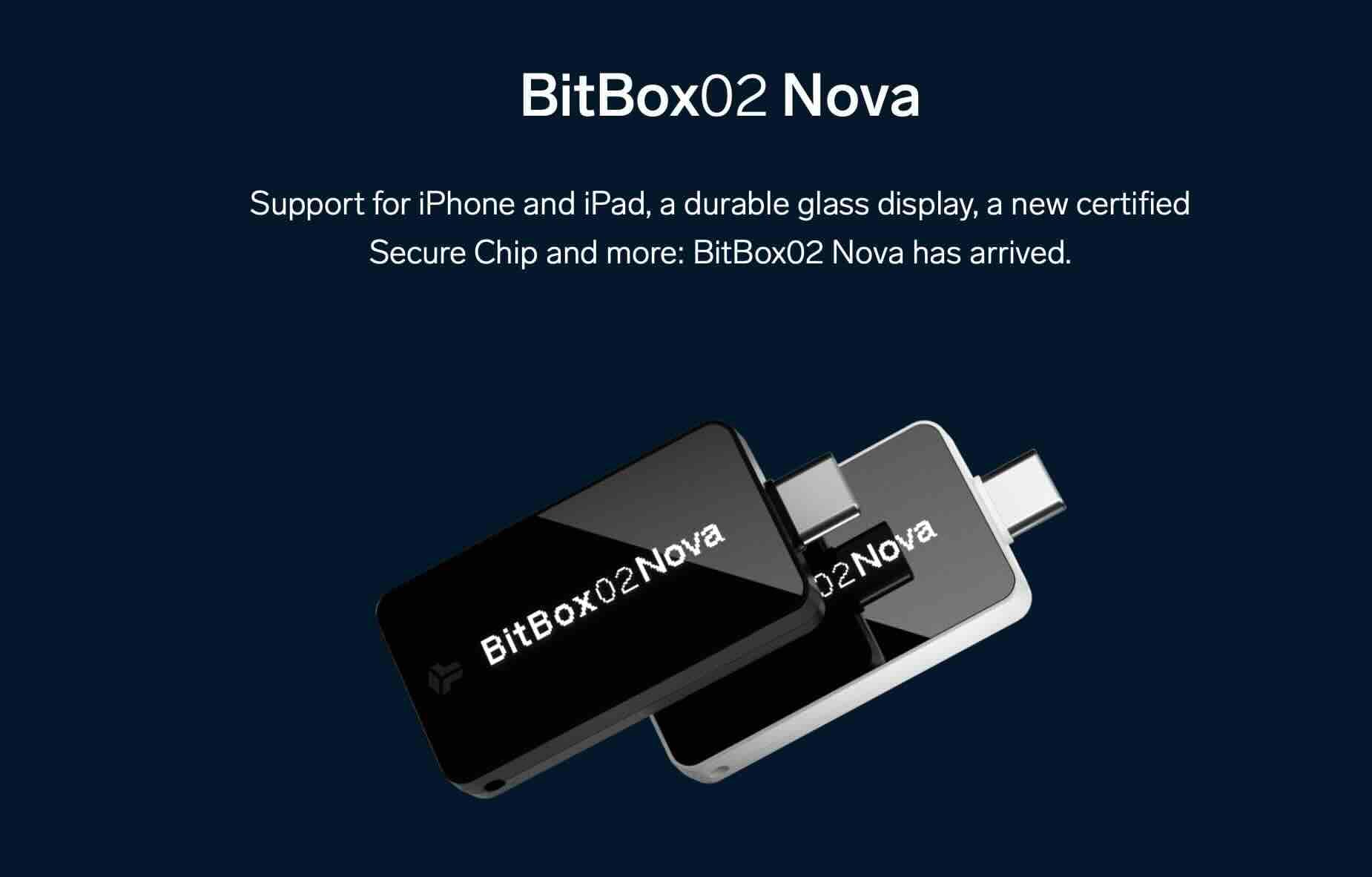
What sets the BitBox02 apart is its emphasis on simplicity. The initial setup takes just minutes, and the accompanying BitBoxApp provides an intuitive interface for managing your Bitcoin. The device supports both Bitcoin-only and multi-crypto versions—serious Bitcoin users typically opt for the Bitcoin-only edition, which has a reduced attack surface since it contains less code.
Security features include a secure chip (similar to those in passports and credit cards), full source transparency with open-source firmware, and automatic encrypted backups to a microSD card. The BitBox02 also supports Tor for enhanced privacy and integrates seamlessly with Electrum for advanced users.
Price point sits around $149, positioning it as a mid-range option that delivers excellent value. For Europeans especially, the Swiss privacy standards and local manufacturing provide additional peace of mind.
Coldcard
If maximum security is your priority and you're willing to sacrifice some convenience, the Coldcard Mk4 is the gold standard. Designed specifically for Bitcoin, this hardware wallet is built with an air-gapped architecture, meaning it can operate entirely offline without ever connecting to a computer via USB.
The Coldcard's security features are extensive: a genuine secure element chip, duress PINs (that reveal a decoy wallet under coercion), brick-me PINs (that destroy the device if needed), and the ability to verify transactions using QR codes or microSD cards. It's the wallet of choice for many Bitcoin maximalists and privacy advocates.
The learning curve is steeper than other hardware wallets. The interface uses a numeric keypad and small screen, and advanced features like PSBTs (Partially Signed Bitcoin Transactions), multisig setups, and air-gapped transaction signing require technical knowledge. However, this complexity translates to unparalleled control and security.
At approximately $149-169 depending on the model, the Coldcard targets serious users with substantial holdings who want military-grade security. It's overkill for beginners but perfect for those who understand the threat model and want the most robust solution available.
Trezor
Trezor, created by SatoshiLabs, pioneered the hardware wallet industry and remains a solid choice in 2025. The Trezor Model T, their flagship device, features a color touchscreen that makes operation intuitive, while the more affordable Trezor Safe 3 offers essential security at a lower price point.
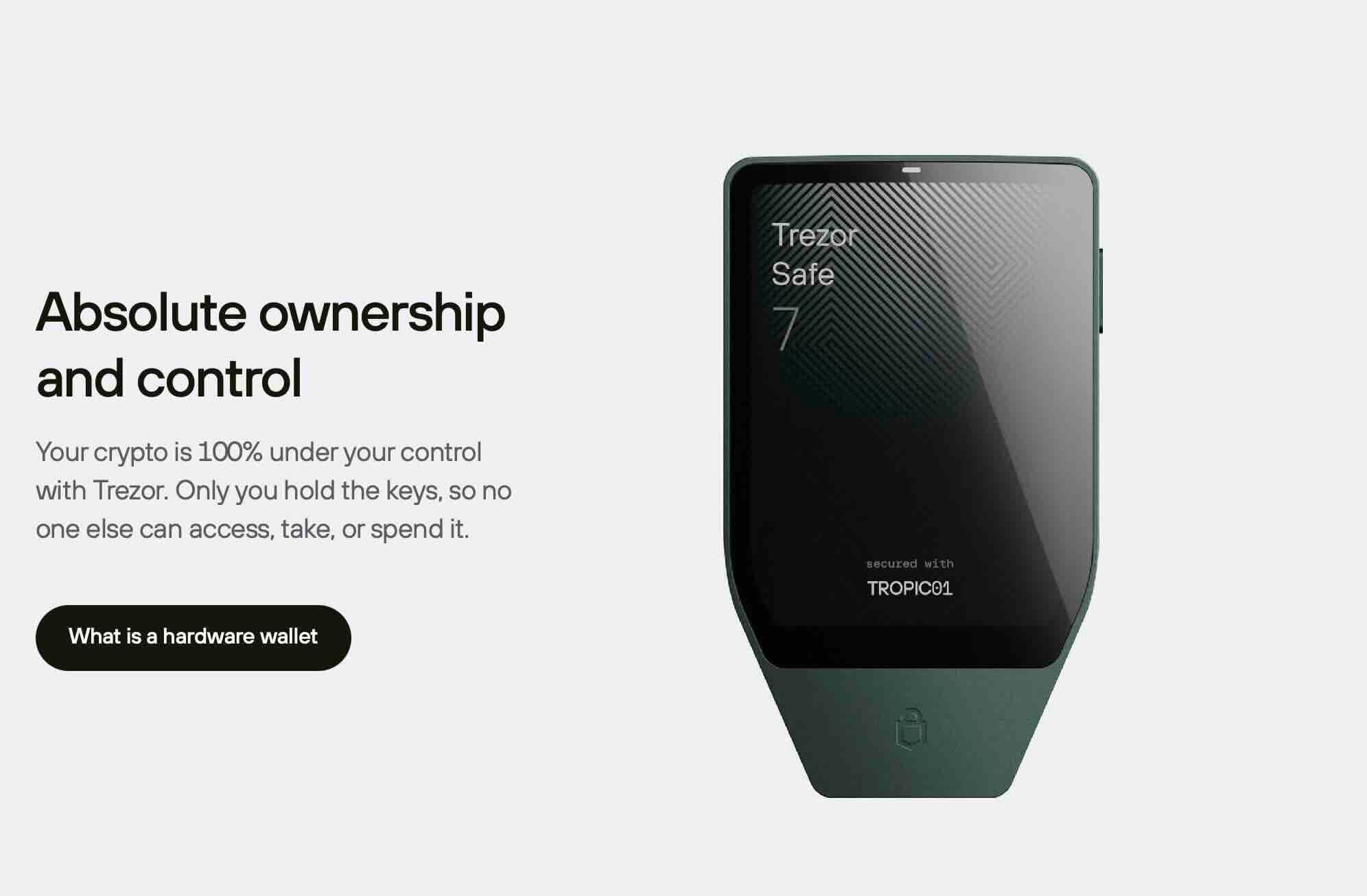
Trezor's open-source philosophy extends to both hardware and software, allowing independent security audits. The device supports advanced features like Shamir Backup (splitting your recovery seed into multiple shares), passphrase protection, and seamless integration with numerous software wallets including Sparrow and Electrum.
One consideration: Trezor devices lack a secure element chip, storing keys in general-purpose microprocessors. While no practical attacks have exploited this in real-world scenarios with updated firmware, it's worth noting for those seeking maximum security. The trade-off is greater transparency—secure elements often require proprietary code.
Pricing ranges from $69 for the Safe 3 to $219 for the Model T, offering options for different budgets. Trezor's decade-long track record and responsive security team make it a trustworthy choice for both beginners and experienced users.
Best Mobile Wallets
Mobile wallets provide the convenience of carrying Bitcoin in your pocket, perfect for everyday transactions and smaller amounts. The best mobile wallets in 2025 prioritize self-custody while offering Lightning Network support for instant payments.
Phoenix
Phoenix, developed by ACINQ, represents the cutting edge of Lightning wallet design. It combines exceptional user experience with non-custodial Lightning, a combination that was once thought impossible. Phoenix handles channel management automatically, abstracting away Lightning's complexity while maintaining self-custody.
The wallet uses a innovative approach called "splicing" to dynamically adjust channel capacity based on your needs. When you receive Lightning payments, Phoenix automatically allocates funds to channels. You remain in full control—your keys, your coins—but don't need to understand channel liquidity or routing.
Phoenix charges small fees for automated channel management (typically 0.1-0.4% of incoming capacity), which is transparent and reasonable given the service provided. For users who want Lightning's speed without technical overhead, it's the best solution available. The wallet also supports on-chain transactions for larger amounts.
Available on iOS and Android, Phoenix works excellently for daily spending, paying Lightning invoices, and receiving payments. It's not ideal for long-term storage of large amounts, but for active use, it's remarkably well-designed.
Breez
Breez takes a comprehensive approach to Bitcoin payments, combining a non-custodial Lightning wallet with a full ecosystem of merchant tools, podcasting features, and point-of-sale functionality. Like Phoenix, Breez abstracts Lightning complexity through automated channel management.
What distinguishes Breez is its "Lightning as a Service" model. The app opens channels for you automatically when you first add funds, and handles all the technical details behind the scenes. You get Lightning's instant payments and low fees without needing to understand the underlying technology.
 Nakamoto Builder
Breez also pioneered features like submarine swaps (seamlessly moving between on-chain and Lightning) and direct connections to your own Lightning node if you want more control. The built-in podcast player with Bitcoin-powered streaming payments (podcasting 2.0) showcases Lightning's potential for micropayments.
The app is completely free and open-source, funded by the Breez company's commercial offerings. For users who want an all-in-one Bitcoin payment solution with excellent user experience, Breez delivers. It's particularly strong for merchants and content creators.
BlueWallet
BlueWallet offers versatility that appeals to both beginners and advanced users. It supports standard Bitcoin wallets, Lightning wallets, and even watch-only wallets for monitoring cold storage. The interface is clean and intuitive, with just enough features to be powerful without overwhelming.
For on-chain Bitcoin, BlueWallet provides HD wallets with full control over your keys. The Lightning functionality uses a custodial LNDHub account by default (Bluewallet holds the Lightning funds), but advanced users can connect to their own LNDHub instance for self-custody. This flexibility lets you start simple and increase control as you learn.
BlueWallet shines in its attention to user experience details: easy labeling and organization of multiple wallets, customizable transaction fees, SegWit and Taproot support, and integration with hardware wallets for enhanced security. The development team actively maintains the app and responds to the community.
Available on iOS and Android, BlueWallet works well as both a beginner's first wallet and an advanced user's mobile companion to their hardware wallet. Just remember that the default Lightning wallet is custodial—great for learning and small amounts, but consider Phoenix or Breez for self-custodial Lightning.
Best Desktop Wallets
Desktop wallets cater to users who want powerful features, detailed control, and the ability to run full validation. These applications turn your computer into a Bitcoin management center.
Sparrow Wallet
Sparrow Wallet has rapidly become the preferred desktop wallet for serious Bitcoin users. Developed by Craig Raw, Sparrow combines an elegant interface with professional-grade features, making advanced Bitcoin management accessible without sacrificing power.
Sparrow excels at transparency. The transaction viewer shows every detail of your transactions, UTXO management is intuitive, and the coin control features let you choose exactly which coins to spend. This matters for privacy—by selecting UTXOs carefully, you can avoid linking addresses and preserve anonymity.
 Nakamoto Builder
Read the article
Hardware wallet integration is exceptional. Sparrow works seamlessly with Coldcard, BitBox02, Trezor, and other devices, making it easy to use your hardware wallet for signing while using Sparrow's superior interface. Multi-signature support is robust, with clear visualization of your setup and co-signers.
Privacy features include built-in Tor support, connection to your own Bitcoin node or Electrum server, and tools like PayNym (for reusable payment codes) and Whirlpool (CoinJoin integration, though this is less commonly used in 2025). Sparrow can also connect to your own Electrum server for enhanced privacy.
The wallet is completely free, open-source, and works on Windows, macOS, and Linux. For anyone managing significant Bitcoin holdings or who values privacy and control, Sparrow is the desktop wallet to choose.
Bitcoin Core
Bitcoin Core is the original Bitcoin wallet and full node implementation. Running Bitcoin Core means you're participating in the Bitcoin network's security and decentralization while maintaining the highest level of validation and privacy.
As a full node, Bitcoin Core downloads and verifies the entire blockchain from genesis—currently over 500GB and growing. This might seem excessive, but it provides complete trustlessness. You don't rely on anyone else's node to tell you transaction validity or your balance. You verify everything yourself according to Bitcoin's consensus rules.
The wallet functionality in Bitcoin Core is deliberately simple. It handles on-chain transactions, provides comprehensive coin control, and supports advanced features like PSBTs and multi-signature. However, it lacks the polished interface of modern wallets—Core prioritizes robustness over user experience.
Bitcoin Core is free, open-source, and maintained by dozens of contributors. It's ideal for experienced users, developers, or anyone who wants to run a full node regardless of the wallet functionality.
Best Wallets for Lightning Network
The Lightning Network has matured significantly, offering instant Bitcoin payments with negligible fees. These wallets specialize in Lightning while maintaining self-custody principles.
Breez
Breez deserves repeated mention as the most comprehensive self-custodial Lightning wallet. Its automated channel management removes Lightning's traditional complexity barriers, making it accessible to non-technical users while preserving the security benefits of self-custody.
The wallet's architecture runs a Lightning node directly on your phone, maintaining your keys locally. You're not trusting a third party with funds, yet you don't need to manage channels manually. Breez handles liquidity through their Lightning Service Provider model, opening channels as needed and routing payments automatically.
For Lightning payments, Breez offers nearly instant transactions with typical fees under 1% (usually much lower). The submarine swap feature seamlessly moves funds between on-chain and Lightning as needed. Built-in support for Lightning addresses (like email addresses for Bitcoin) makes receiving payments trivially easy.
Breez works best for users who primarily transact in Lightning—think daily coffee purchases, online payments, or receiving payments regularly. The combination of self-custody, automation, and excellent user experience makes it hard to beat.
Phoenix
Phoenix approaches Lightning with equal emphasis on simplicity and self-custody. ACINQ's wallet pioneered automated splicing, which elegantly solves channel management without sacrificing non-custodial principles.
The technical implementation is brilliant: Phoenix opens a single channel to ACINQ's well-connected Lightning node, then uses splicing to resize that channel dynamically. When you receive payments exceeding channel capacity, Phoenix automatically performs an on-chain transaction to increase capacity. You're always in control of your keys, but never think about channels.
This approach has trade-offs. Phoenix charges fees for automated services (typically 0.1% with a 3000 satoshi minimum), and you're dependent on ACINQ's node for routing. However, the fees are transparent and reasonable, and ACINQ's node is highly reliable with excellent connectivity.
Phoenix shines for users who want Lightning's benefits without any technical knowledge. It works reliably, recovers gracefully from issues, and provides a genuinely delightful user experience. For sending and receiving Lightning payments casually or regularly, it's exceptional.
Bitcoin Wallet Comparison Table
| Wallet | Type | Self-Custody | Lightning | Best For | Price |
|---|---|---|---|---|---|
| BitBox02 | Hardware | Yes | No | Security + Simplicity | $149 |
| Coldcard | Hardware | Yes | No | Maximum Security | $149-169 |
| Trezor | Hardware | Yes | No | Open-Source Security | $69-219 |
| Phoenix | Mobile | Yes | Yes | Daily Lightning Use | Free |
| Breez | Mobile | Yes | Yes | Lightning Ecosystem | Free |
| BlueWallet | Mobile | Yes | Yes* | Versatile Mobile Wallet | Free |
| Sparrow | Desktop | Yes | No | Advanced Management | Free |
| Bitcoin Core | Desktop | Yes | No | Full Node Sovereignty | Free |
*BlueWallet's default Lightning wallet is custodial; can connect to self-custodial LNDHub
How to Choose the Right Bitcoin Wallet
Selecting the ideal Bitcoin wallet depends on your specific needs, technical comfort level, and how you plan to use Bitcoin. Here's a framework for making the decision:
Consider Your Primary Use Case
Are you storing Bitcoin long-term as savings? Hardware wallets like BitBox02 or Coldcard provide optimal security. Planning to spend Bitcoin regularly for purchases? Mobile Lightning wallets like Phoenix or Breez offer convenience and speed. Need detailed control over transactions and privacy? Desktop wallets like Sparrow deliver power-user features.
Evaluate Your Amount
The security level should match your holdings. For amounts you'd be comfortable losing, mobile wallets work fine. For life-changing amounts, hardware wallets are essential. Many users employ a tiered approach: hardware wallet for savings, mobile wallet for spending money, similar to keeping most money in a bank but some cash in your wallet.
Assess Your Technical Skill
Be honest about your comfort with technology. Beginners should start with user-friendly options like BitBox02 or Phoenix that abstract complexity. Advanced users can leverage Coldcard's air-gapped operations or Sparrow's detailed controls. There's no shame in starting simple—you can always upgrade to more advanced solutions as you learn.
Privacy Requirements
If privacy matters significantly to you, prioritize wallets with Tor support, coin control features, and the ability to connect to your own node. Sparrow connected to your Bitcoin Core node via Tor provides excellent privacy. Avoid custodial services that require KYC identification if anonymity is a goal.
Lightning Network Needs
If you plan to use Lightning for fast, cheap payments, this narrows your choices considerably. Phoenix and Breez stand out for self-custodial Lightning with excellent user experience. Traditional hardware wallets don't support Lightning directly, though some integrate with Lightning-enabled software wallets.
Budget Considerations
Quality Bitcoin wallets span from free (Sparrow, Breez, Bitcoin Core) to a few hundred dollars (Trezor Model T, premium hardware wallets). The free options are genuinely excellent—you're not sacrificing security by choosing them. Hardware wallets represent a worthwhile investment for significant holdings, with even the premium Coldcard costing less than 1% of a modest Bitcoin stack.
Multi-Wallet Strategy
Consider using multiple wallets for different purposes. A common setup: Coldcard or BitBox02 for cold storage, Sparrow as your desktop interface connected to your hardware wallet, and Phoenix for Lightning spending. This combination provides security for savings, power for management, and convenience for daily use.
Conclusion
The Bitcoin wallet landscape in 2025 offers something for everyone, from complete beginners to security-obsessed experts. Hardware wallets like BitBox02, Coldcard, and Trezor provide robust security for long-term holdings.
Mobile wallets like Phoenix, Breez, and BlueWallet bring Bitcoin into daily life with Lightning's speed and convenience. Desktop solutions like Sparrow and Bitcoin Core offer power users complete control and privacy.
Your wallet choice isn't permanent. Start with what makes sense for your current situation and evolve as your needs change. The most important decision is simply to take custody of your Bitcoin, moving it off exchanges into wallets where you control the keys.
Ready to explore more options? Browse the complete directory of Bitcoin wallets and tools on Bitcoin Builder to find the perfect solution for your needs.
