


If you've ever sent a Bitcoin transaction and wondered where it goes before being confirmed, you've stumbled upon one of Bitcoin's most fascinating components: the mempool.
Think of it as the waiting room where your transaction hangs out before getting its ticket to the blockchain. Let's dive into what makes this digital waiting room tick.
What is the Mempool?
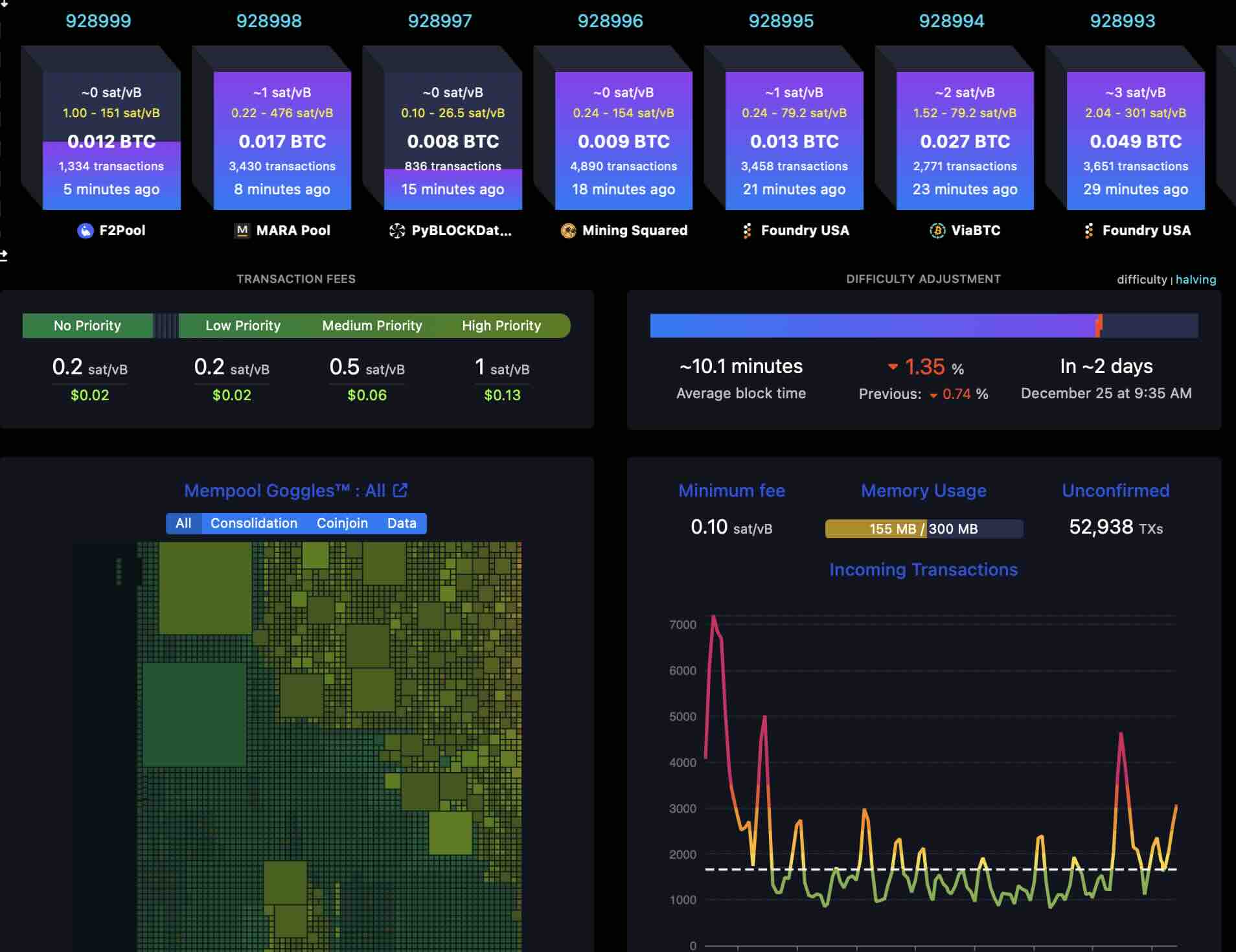
The mempool, short for memory pool, is essentially a holding area for unconfirmed Bitcoin transactions. When you broadcast a transaction to the Bitcoin network, it doesn't immediately make it into a block. Instead, it first enters the mempool where it waits to be picked up by miners.
Here's the cool part: every node on the Bitcoin network maintains its own mempool. This means there isn't just one universal mempool, but rather thousands of individual mempools across the network. While they're mostly synchronized, slight variations can occur based on network propagation and individual node configurations.
How Does the Mempool Work?
The mempool operates on a pretty straightforward principle, but with some nuanced mechanics:
1. Transaction Broadcast
When you send Bitcoin, your wallet creates and broadcasts a transaction to the network. This transaction propagates from node to node, entering each node's mempool along the way. The broadcast process typically takes just a few seconds to reach most of the network.
2. Validation
Before accepting a transaction into their mempool, nodes verify it follows Bitcoin's rules: valid signatures, sufficient funds, proper format, and no double-spending attempts. If a transaction fails validation, it's rejected and won't enter the mempool.
3. Prioritization
Transactions in the mempool are prioritized primarily by fee rate (satoshis per virtual byte, or sat/vB). Miners, being economically rational actors, typically select transactions with the highest fee rates when building blocks, as this maximizes their revenue. This creates a competitive marketplace for block space.
4. Mining Selection
When a miner finds a new block, they select transactions from their mempool to include. Once a transaction is included in a valid block that gets added to the blockchain, it's removed from the mempool across the network.
Why Does Mempool Size Matter?
The size of the mempool is a crucial indicator of network congestion. When demand for block space exceeds supply, the mempool grows. This has direct implications for users:
High Mempool = Higher Fees: When the mempool is crowded, you'll need to pay higher fees to get your transaction confirmed in a reasonable timeframe. During peak congestion in 2021 and 2023, fees spiked dramatically as users competed for limited block space.
Confirmation Times: A bloated mempool means longer wait times for low-fee transactions. Some transactions might wait hours or even days during high-congestion periods.
Transaction Eviction: Most nodes have a default mempool size limit (typically 300 MB). When this limit is reached, transactions with the lowest fee rates get dropped. If your transaction gets evicted, you'll need to rebroadcast it with a higher fee.
Mempool Dynamics and Transaction Strategies
Understanding mempool dynamics can help you optimize your Bitcoin transactions:
Replace-by-Fee (RBF): If you set a fee too low, RBF lets you broadcast a replacement transaction with a higher fee. This is incredibly useful when you're stuck with a pending transaction during rising network congestion.
Child-Pays-For-Parent (CPFP): If you receive an unconfirmed transaction with a low fee, you can spend it with a higher fee transaction. Miners will include both transactions together since they're economically linked.
Fee Estimation: Modern wallets analyze mempool data to recommend appropriate fees. They look at recent transaction fee rates and current mempool composition to predict what fee rate will get you confirmed within your desired timeframe.
Monitoring the Mempool
Several tools let you peek into the mempool's current state:
Mempool.space: The go-to resource for real-time mempool visualization. It shows mempool size, fee distributions, and provides transaction tracking. The block height visualization is particularly useful for understanding how many blocks deep your transaction might be.
Bitcoin Core: Running your own node gives you direct access to your local mempool through RPC commands like getmempoolinfo and getrawmempool.
Block Explorers: Services like Blockchair and Blockchain.com provide mempool statistics and transaction tracking capabilities.
Technical Details for the Curious
For those wanting to dig deeper, here are some technical aspects:
Memory vs. Disk Storage: Despite the name, mempools can use both RAM and disk storage. Bitcoin Core, for instance, stores mempool data in memory but also maintains a mempool.dat file for persistence across restarts.
Ancestor and Descendant Limits: Bitcoin Core limits transaction chains to prevent abuse. By default, a transaction can't have more than 25 ancestors or descendants in the mempool, and the total size of all related transactions can't exceed 101,000 bytes.
Compact Block Relay: The mempool plays a crucial role in Bitcoin's bandwidth optimization. When a new block is found, nodes don't need to transmit full transaction data since most transactions are already in receiving nodes' mempools. They just send short identifiers, dramatically reducing bandwidth requirements.
Common Mempool Misconceptions
"Transactions are stuck forever": Most nodes drop transactions after about 14 days. If your transaction hasn't confirmed by then, it'll be purged, and the funds return to your control. You can then rebroadcast with a higher fee.
"There's one global mempool": As mentioned, each node maintains its own mempool. While they converge toward similar states, differences exist due to network propagation delays and varying node policies.
"Higher fee guarantees instant confirmation": While higher fees increase your chances, there's still randomness in mining. A block might be found immediately after your transaction, or it might take 30 minutes. Fee rates control priority, not exact timing.
Practical Implications for Bitcoin Users
Understanding the mempool helps you make smarter decisions:
Timing Your Transactions: Mempool activity typically follows patterns. Weekends often see lower congestion and cheaper fees. If your transaction isn't urgent, waiting for a quieter period can save significant satoshis.
Batch Transactions: If you're making multiple payments, batching them into a single transaction is more efficient and costs less in fees. Many businesses do this to optimize their Bitcoin operations.
Using SegWit and Taproot: These modern address formats reduce transaction size, meaning lower fees for the same priority level in the mempool. If your wallet supports them, use bech32 or bech32m addresses.
The Bottom Line
The mempool is more than just a technical curiosity, it's the beating heart of Bitcoin's transaction processing system. By understanding how it works, you can navigate network congestion more effectively, save on fees, and have realistic expectations about confirmation times.
Whether you're a casual user or a Bitcoin power user, keeping an eye on mempool conditions will make your Bitcoin experience smoother and more cost-effective.
Next time you send a Bitcoin transaction, remember: it's not just floating in the digital ether. It's in the mempool, competing for block space in the most revolutionary monetary network humanity has ever created.
